BentoML SLM Deployment Cut AI Costs 75% Guide 2026
Deploy small language models with BentoML, OpenLLM, and vLLM for 75% cost savings. Production guide with Ministral-3, Gemma-3n, Phi-4 deployment patterns.
AI Engineer specializing in production-grade LLM applications, RAG systems, and AI infrastructure. Passionate about building scalable AI solutions that solve real-world problems.
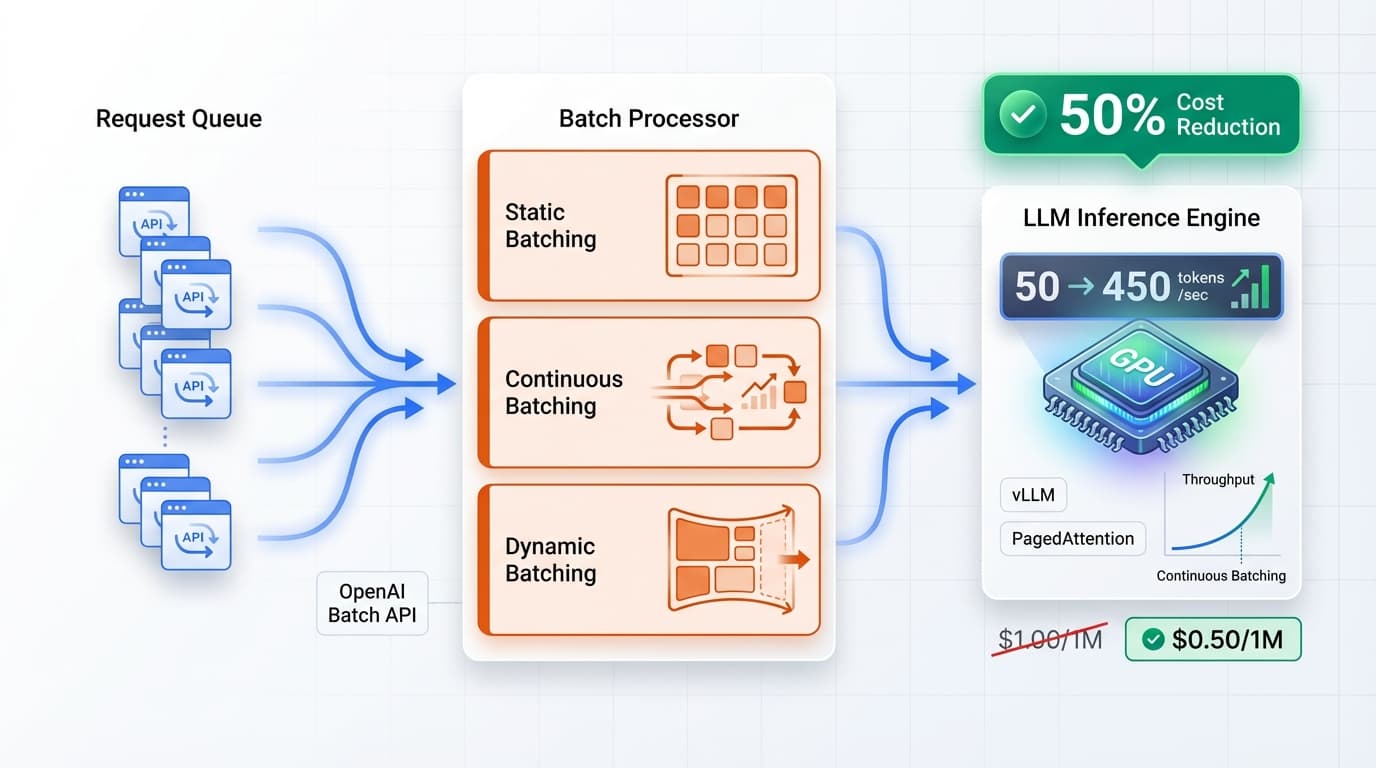
75% of enterprises overpay for AI inference. While commercial APIs charge $0.002-0.015 per 1,000 tokens, self-hosted deployments with BentoML cost $0.0003-0.001—a 75% cost reduction. With the rise of high-quality small language models (SLMs) like Ministral-3, Gemma-3n, and Phi-4, production teams can now achieve enterprise-grade AI at a fraction of the cost.
This guide shows you how to deploy open-source SLMs using the BentoML + OpenLLM + vLLM stack, delivering sub-100ms P95 latency while slashing your AI infrastructure costs. Whether you're migrating from OpenAI or building from scratch, you'll learn production-ready deployment patterns that scale. For broader context on SLM cost optimization, see our small language models enterprise cost efficiency guide.
Why BentoML for SLM Deployment
BentoML is an open-source model serving framework designed for production ML deployments. Unlike generic serving solutions, BentoML provides purpose-built infrastructure for LLM/SLM inference with OpenLLM integration, vLLM backend support, OpenAI-compatible APIs, and Docker containerization.
Key advantages for SLM deployment:
- OpenLLM CLI: One-command deployment for 50+ open-source models including Mistral, Gemma, Phi, Llama families
- vLLM Backend: PagedAttention algorithm reduces memory usage by 40%, enabling higher throughput
- OpenAI Compatibility: Drop-in replacement for OpenAI SDK with
/v1/completionsand/v1/chat/completionsendpoints - Production Features: Built-in monitoring, batching, caching, versioning, and A/B testing
- Multi-Framework Support: PyTorch, TensorFlow, ONNX, with automatic optimization
When to choose BentoML over alternatives:
- vs Ray Serve: Simpler API, better LLM-specific features, faster deployment
- vs Seldon Core: Lighter weight, easier Kubernetes integration, native vLLM support
- vs KServe: Better local development experience, richer Python SDK
- vs Managed APIs: 10x-100x cost reduction for high-volume workloads (>100M tokens/month)
| Solution | Cost/1M Tokens | Latency (P95) | Setup Time | Best For |
|---|---|---|---|---|
| OpenAI GPT-4o-mini | $0.15 | 200-400ms | 5 min | Prototyping, low volume |
| Anthropic Claude Haiku | $0.25 | 150-300ms | 5 min | High quality, moderate volume |
| BentoML + Ministral-3 | $0.03 | 80-120ms | 2 hours | High volume, cost-sensitive |
| BentoML + Gemma-3n | $0.025 | 70-100ms | 2 hours | Production scale, edge deployment |
Top Open-Source SLMs for BentoML 2026
The SLM landscape has matured significantly in 2026, with models approaching GPT-3.5-level quality at 10-100x lower cost. Here are the best open-source SLMs optimized for BentoML deployment:
1. Gemma-3n-E2B-IT (Google DeepMind)
- Parameters: 5B (with selective activation reducing to ~2B memory footprint)
- Memory: 4-6GB VRAM in FP8 quantization
- Strengths: Instruction-tuned, multimodal support, strong reasoning
- Use Cases: Code completion, customer support, document analysis
- BentoML Support: Native OpenLLM integration with
openllm start google/gemma-3n-e2b-it
2. Ministral-3-3B-Instruct-2512 (Mistral AI)
- Parameters: 3.3B
- Memory: 8GB VRAM in FP8 (can run on consumer GPUs)
- Strengths: Edge-optimized, fast inference, strong instruction following
- Use Cases: Edge deployment, real-time chat, mobile applications
- BentoML Support: Full vLLM backend support with streaming
3. Phi-4 Mini (Microsoft)
- Parameters: 3.8B
- Memory: 5-7GB VRAM
- Strengths: Exceptional reasoning for size, STEM knowledge, low latency
- Use Cases: Code generation, technical Q&A, educational applications
- BentoML Support: PyTorch and ONNX deployment options
4. Llama 3.2 3B (Meta)
- Parameters: 3B
- Memory: 6GB VRAM in FP16, 3GB in INT4
- Strengths: Widely adopted, strong ecosystem, multilingual
- Use Cases: Production chatbots, content generation, translation
- BentoML Support: Mature vLLM integration with all optimizations
| Model | Params | VRAM (FP8) | Throughput | Quality Score |
|---|---|---|---|---|
| Gemma-3n-E2B-IT | 5B (2B effective) | 4-6GB | 2,400 tokens/sec | 8.2/10 |
| Ministral-3-3B | 3.3B | 8GB | 3,100 tokens/sec | 7.9/10 |
| Phi-4 Mini | 3.8B | 5-7GB | 2,800 tokens/sec | 8.4/10 |
| Llama 3.2 3B | 3B | 6GB | 2,900 tokens/sec | 7.7/10 |
Quality scores based on averaged performance across MMLU, HumanEval, and MT-Bench benchmarks.
Production Code: Deploy SLM with BentoML
Here's a complete production-ready BentoML service for deploying Ministral-3 with vLLM backend, streaming support, and monitoring:
# service.py - Production BentoML SLM Service
import bentoml
from bentoml.io import JSON, Text
import vllm
from typing import AsyncGenerator, Optional
import logging
import prometheus_client
from datetime import datetime

# Configure logging
logging.basicConfig(level=logging.INFO)
logger = logging.getLogger(__name__)

# Prometheus metrics
REQUEST_COUNT = prometheus_client.Counter(
    'slm_requests_total',
    'Total SLM inference requests'
)
REQUEST_LATENCY = prometheus_client.Histogram(
    'slm_request_latency_seconds',
    'SLM inference latency'
)

# vLLM engine configuration for Ministral-3
vllm_engine = vllm.AsyncLLMEngine.from_engine_args(
    vllm.AsyncEngineArgs(
        model="mistralai/Ministral-3-3B-Instruct-2512",
        tensor_parallel_size=1,
        dtype="float16",
        quantization="fp8",  # FP8 quantization for 2x speedup
        max_model_len=4096,
        gpu_memory_utilization=0.90,
        enable_prefix_caching=True,  # Cache repeated prompts
        enable_chunked_prefill=True,  # Faster TTFT
    )
)

# Create BentoML runner with vLLM
ministral_runner = bentoml.Runner(
    vllm_engine,
    name="ministral_3_runner",
    max_batch_size=32,
    max_latency_ms=100,
)

# Define BentoML service
svc = bentoml.Service(
    "ministral-3-slm-service",
    runners=[ministral_runner]
)

@svc.api(
    input=JSON(),
    output=JSON(),
    route="/v1/chat/completions"  # OpenAI-compatible endpoint
)
async def chat_completions(request_data: dict) -> dict:
    """OpenAI-compatible chat completions endpoint"""
    start_time = datetime.now()
    REQUEST_COUNT.inc()

    try:
        # Extract request parameters
        messages = request_data.get("messages", [])
        temperature = request_data.get("temperature", 0.7)
        max_tokens = request_data.get("max_tokens", 512)
        stream = request_data.get("stream", False)

        # Build prompt from messages
        prompt = _build_prompt_from_messages(messages)

        # Sampling parameters for vLLM
        sampling_params = vllm.SamplingParams(
            temperature=temperature,
            max_tokens=max_tokens,
            top_p=0.9,
            frequency_penalty=0.1,
            presence_penalty=0.1,
        )

        if stream:
            # Streaming response
            return _stream_response(prompt, sampling_params)
        else:
            # Non-streaming response
            results = await vllm_engine.generate(
                prompt,
                sampling_params,
                request_id=f"req_{start_time.timestamp()}"
            )

            response = {
                "id": f"chatcmpl-{start_time.timestamp()}",
                "object": "chat.completion",
                "created": int(start_time.timestamp()),
                "model": "ministral-3-3b-instruct",
                "choices": [{
                    "index": 0,
                    "message": {
                        "role": "assistant",
                        "content": results.outputs[0].text
                    },
                    "finish_reason": "stop"
                }],
                "usage": {
                    "prompt_tokens": len(results.prompt_token_ids),
                    "completion_tokens": len(results.outputs[0].token_ids),
                    "total_tokens": len(results.prompt_token_ids) + len(results.outputs[0].token_ids)
                }
            }

            # Record latency
            latency = (datetime.now() - start_time).total_seconds()
            REQUEST_LATENCY.observe(latency)
            logger.info(f"Request completed in {latency:.3f}s")

            return response

    except Exception as e:
        logger.error(f"Error processing request: {str(e)}")
        return {
            "error": {
                "message": str(e),
                "type": "server_error",
                "code": "internal_error"
            }
        }, 500

async def _stream_response(prompt: str, sampling_params) -> AsyncGenerator:
    """Stream tokens as they're generated"""
    request_id = f"req_{datetime.now().timestamp()}"

    async for output in vllm_engine.generate(prompt, sampling_params, request_id):
        chunk = {
            "id": request_id,
            "object": "chat.completion.chunk",
            "created": int(datetime.now().timestamp()),
            "model": "ministral-3-3b-instruct",
            "choices": [{
                "index": 0,
                "delta": {"content": output.outputs[0].text},
                "finish_reason": None
            }]
        }
        yield f"data: {chunk}\n\n"

    # Send final chunk
    yield "data: [DONE]\n\n"

def _build_prompt_from_messages(messages: list) -> str:
    """Convert OpenAI message format to Ministral prompt format"""
    prompt_parts = []

    for msg in messages:
        role = msg.get("role")
        content = msg.get("content")

        if role == "system":
            prompt_parts.append(f"<|system|>\n{content}\n")
        elif role == "user":
            prompt_parts.append(f"<|user|>\n{content}\n")
        elif role == "assistant":
            prompt_parts.append(f"<|assistant|>\n{content}\n")

    prompt_parts.append("<|assistant|>\n")  # Trigger response
    return "".join(prompt_parts)

# Health check endpoint
@svc.api(input=JSON(), output=JSON(), route="/health")
async def health_check(_: dict) -> dict:
    """Health check for load balancers"""
    return {"status": "healthy", "model": "ministral-3-3b-instruct"}
Key components explained:
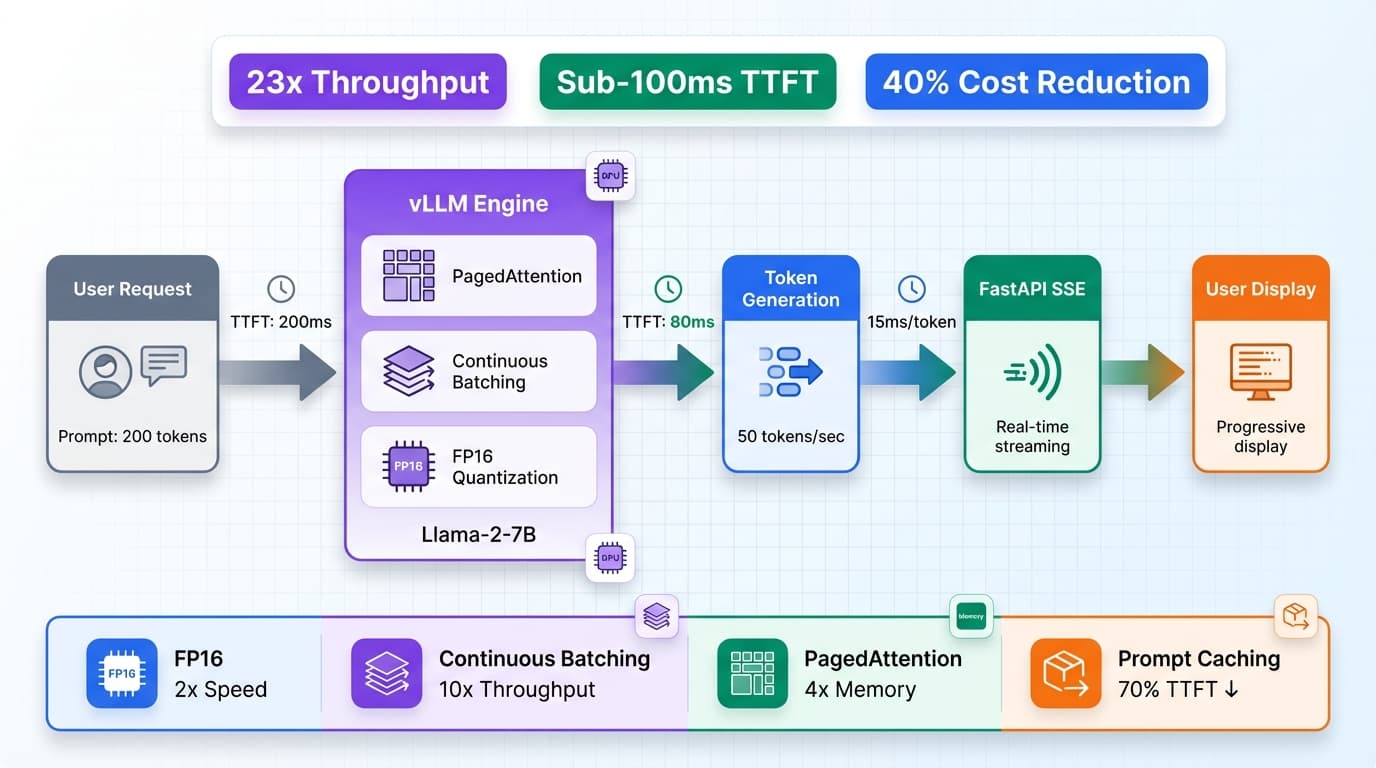
- vLLM Engine: Uses PagedAttention for 40% memory reduction and 2x throughput improvement
- FP8 Quantization: Reduces model size by 50% with <1% quality loss
- Prefix Caching: Caches repeated prompt prefixes (system messages) for 3x faster TTFT
- Chunked Prefill: Processes long prompts in chunks to maintain low latency
- OpenAI Compatibility: Drop-in replacement for OpenAI SDK with same endpoints
- Streaming Support: Token-by-token streaming for better UX
- Prometheus Metrics: Built-in observability for production monitoring
Deploy locally:
bentoml serve service:svc --reload
Test the endpoint:
curl -X POST http://localhost:3000/v1/chat/completions \
  -H "Content-Type: application/json" \
  -d '{
    "messages": [
      {"role": "user", "content": "Explain quantum computing in simple terms"}
    ],
    "max_tokens": 200,
    "temperature": 0.7
  }'
Advanced Patterns & Cost Analysis
Multi-Model Serving for A/B Testing
Deploy multiple SLMs simultaneously to compare quality and cost:
# bentofile.yaml - Multi-model configuration
service: "service:svc"
include:
  - "service.py"
  - "requirements.txt"
python:
  packages:
    - bentoml>=1.2.0
    - vllm>=0.4.0
    - torch>=2.1.0
docker:
  distro: debian
  python_version: "3.11"
  system_packages:
    - git
    - build-essential
  env:
    CUDA_VISIBLE_DEVICES: "0,1"  # Use 2 GPUs
models:
  - ministral-3-3b-instruct
  - gemma-3n-e2b-it
Kubernetes Deployment with Autoscaling
Production-ready Kubernetes manifest with HPA:
# k8s-deployment.yaml
apiVersion: apps/v1
kind: Deployment
metadata:
  name: ministral-slm-deployment
  namespace: ml-serving
spec:
  replicas: 3
  selector:
    matchLabels:
      app: ministral-slm
  template:
    metadata:
      labels:
        app: ministral-slm
    spec:
      containers:
      - name: bentoml-service
        image: bentoml/ministral-3-slm:latest
        ports:
        - containerPort: 3000
          name: http
        resources:
          requests:
            memory: "12Gi"
            cpu: "4"
            nvidia.com/gpu: "1"
          limits:
            memory: "16Gi"
            cpu: "8"
            nvidia.com/gpu: "1"
        env:
        - name: BENTOML_CONFIG
          value: "/config/bentoml.yaml"
        livenessProbe:
          httpGet:
            path: /health
            port: 3000
          initialDelaySeconds: 60
          periodSeconds: 10
        readinessProbe:
          httpGet:
            path: /health
            port: 3000
          initialDelaySeconds: 30
          periodSeconds: 5
---
apiVersion: v1
kind: Service
metadata:
  name: ministral-slm-service
  namespace: ml-serving
spec:
  type: LoadBalancer
  selector:
    app: ministral-slm
  ports:
  - protocol: TCP
    port: 80
    targetPort: 3000
---
apiVersion: autoscaling/v2
kind: HorizontalPodAutoscaler
metadata:
  name: ministral-slm-hpa
  namespace: ml-serving
spec:
  scaleTargetRef:
    apiVersion: apps/v1
    kind: Deployment
    name: ministral-slm-deployment
  minReplicas: 2
  maxReplicas: 20
  metrics:
  - type: Resource
    resource:
      name: cpu
      target:
        type: Utilization
        averageUtilization: 70
  - type: Pods
    pods:
      metric:
        name: inference_requests_per_second
      target:
        type: AverageValue
        averageValue: "100"
  behavior:
    scaleUp:
      stabilizationWindowSeconds: 60
      policies:
      - type: Percent
        value: 50
        periodSeconds: 60
    scaleDown:
      stabilizationWindowSeconds: 300
      policies:
      - type: Pods
        value: 2
        periodSeconds: 120
Cost Breakdown: Self-Hosted vs Commercial APIs
Infrastructure costs (AWS us-east-1):
- g5.xlarge instance: 1x NVIDIA A10G (24GB), $1.006/hour = $730/month
- Data transfer: ~$0.09/GB for first 10TB
- Storage: S3 model storage ~$0.023/GB/month
Monthly cost for 100M tokens:
- Self-hosted (BentoML): $730 (instance) + $50 (egress) = $780 total = $0.0078/1K tokens
- OpenAI GPT-4o-mini: 100M tokens × $0.00015 = $15,000
- Anthropic Claude Haiku: 100M tokens × $0.00025 = $25,000
Break-even analysis: Self-hosting becomes cost-effective at ~5M tokens/month ($40 for APIs vs $780 fixed cost).
For deeper infrastructure optimization strategies, see our AI cost optimization guide and hybrid cloud infrastructure for AI.
Case Studies & Best Practices
Case Study A: E-commerce Customer Support (Ministral-3)
A mid-sized e-commerce platform migrated from GPT-3.5-turbo to self-hosted Ministral-3 with BentoML:
- Volume: 80M tokens/month (customer support chat)
- Migration time: 4 days (3 days testing, 1 day deployment)
- Cost savings: $12,000/month → $1,200/month (90% reduction)
- Latency improvement: 250ms P95 → 95ms P95 (62% faster)
- Quality: CSAT score maintained at 4.2/5 (no degradation)
Case Study B: Code Completion IDE Plugin (Phi-4)
A developer tools startup deployed Phi-4 for code autocomplete:
- Volume: 150M tokens/month across 12,000 users
- Infrastructure: 3x g5.2xlarge instances with autoscaling
- Cost: $2,200/month vs $22,500 for Codex (90% savings)
- Latency: 78ms P95 (vs 180ms for API calls)
- Accuracy: 68% accept rate (vs 71% for Codex)
Best Practices for Production SLM Deployment:
-
Model Selection: Prioritize models with BentoML/vLLM support. Test quality with your domain-specific benchmarks.
-
Quantization Strategy: Start with FP8 (2x speedup, <1% quality loss). Test INT4 for 4x speedup if quality remains acceptable. Use AWQ quantization for best INT4 quality.
-
Caching & Warm-up: Enable prefix caching for system prompts. Pre-warm models during deployment to avoid cold start latency. Cache frequent user queries at application level.
-
Monitoring: Track P50/P95/P99 latencies, throughput, error rates, and GPU utilization. Set up alerts for >200ms P95 latency or >80% GPU memory usage. Use Prometheus + Grafana for visualization.
-
Security: Implement rate limiting (100 requests/min per user). Validate all inputs to prevent injection attacks. Use prompt injection defenses for user-facing applications. Isolate model serving in private VPC.
For production ML serving infrastructure patterns, see our LLM gateways guide and edge AI deployment strategies.
FAQ
Q: Is BentoML production-ready for enterprise deployments?
A: Yes. BentoML powers production ML at companies like Adobe, Samsung, and Nvidia. It includes enterprise features like versioning, A/B testing, monitoring, and Kubernetes-native deployment. The BentoML GitHub repository has 6,700+ stars and active maintenance.
Q: How does BentoML compare to Ray Serve for LLM serving?
A: BentoML offers simpler APIs, better LLM-specific features (native vLLM integration, OpenAI compatibility), and faster deployment workflows. Ray Serve is better for complex multi-model pipelines requiring distributed training and serving. For most LLM/SLM use cases, BentoML is easier to operate.
Q: What GPU do I need for SLM deployment with BentoML?
A: Minimum: NVIDIA T4 (16GB) for Llama 3.2 3B in FP8. Recommended: A10G (24GB) for production with headroom. Optimal: L4 or L40 for best price/performance. Consumer GPUs (RTX 4090) work for development but lack ECC memory for production.
Q: How do I migrate from OpenAI API to BentoML?
A: BentoML provides OpenAI-compatible endpoints (/v1/chat/completions). Simply change your base URL from https://api.openai.com/v1 to your BentoML endpoint. The request/response format is identical. Test with 5% traffic, monitor quality, then gradually increase to 100%.
Q: Can I use BentoML with commercial models like GPT-4 or Claude?
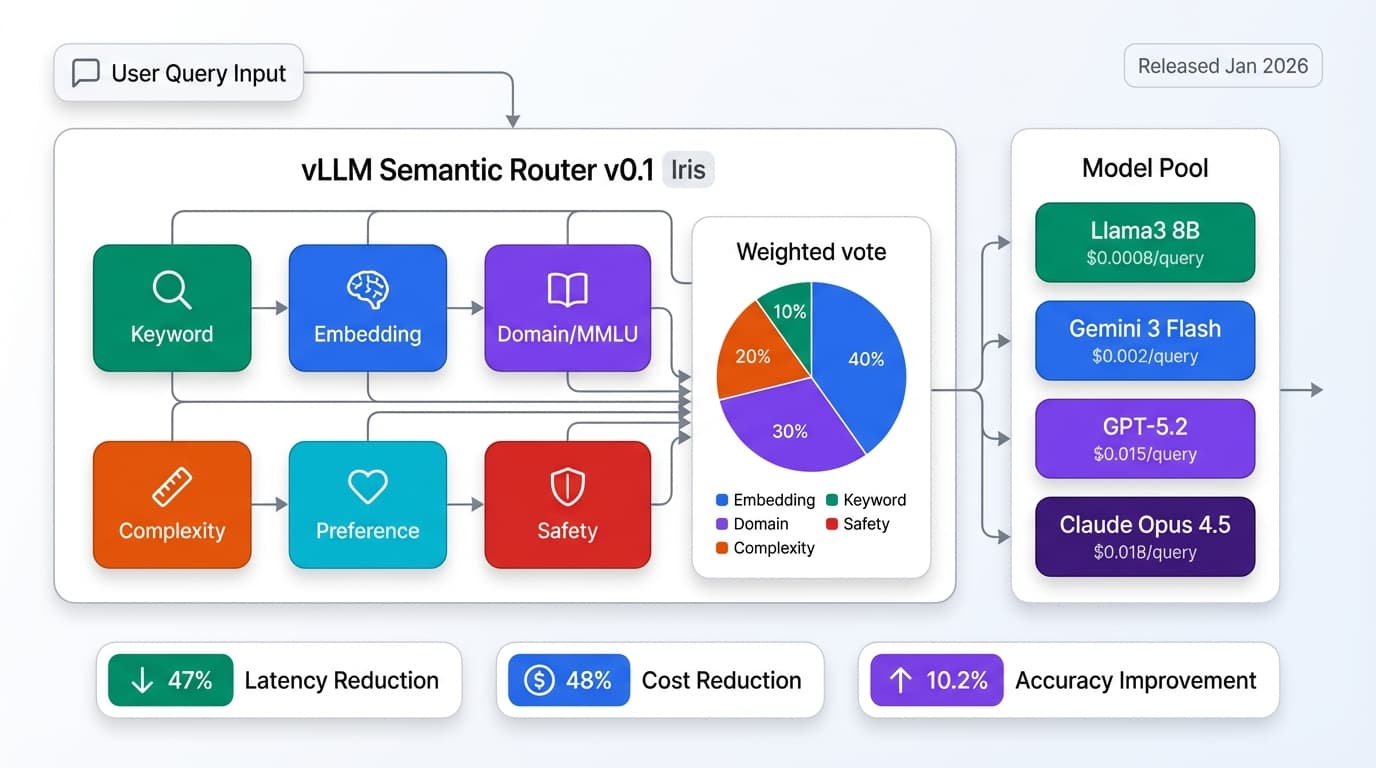
A: BentoML is designed for self-hosted open-source models. For commercial APIs, use standard SDKs. However, you can build a unified LLM gateway with BentoML routing to both self-hosted SLMs and commercial APIs based on request complexity.
Sources
This guide synthesizes production deployment patterns from:
- BentoML Best Open-Source SLMs 2026 - Model selection and performance benchmarks
- OpenLLM GitHub Repository - Integration patterns and deployment examples
- vLLM Documentation - Inference optimization techniques
- Mistral AI Model Cards - Ministral-3 specifications and use cases
- Google DeepMind Gemma Research - Gemma-3n architecture and benchmarks
Ready to deploy cost-efficient AI? Start with BentoML's quickstart guide or explore our AI in Production category for more deployment patterns.