AI Automation for Small Business 2025: Step-by-Step Implementation Guide (Save 20+ Hours)
Step-by-step guide to implementing AI automation in small business. Save 20+ hours monthly with practical tools, costs, and real examples.
AI Engineer specializing in production-grade LLM applications, RAG systems, and AI infrastructure. Passionate about building scalable AI solutions that solve real-world problems.
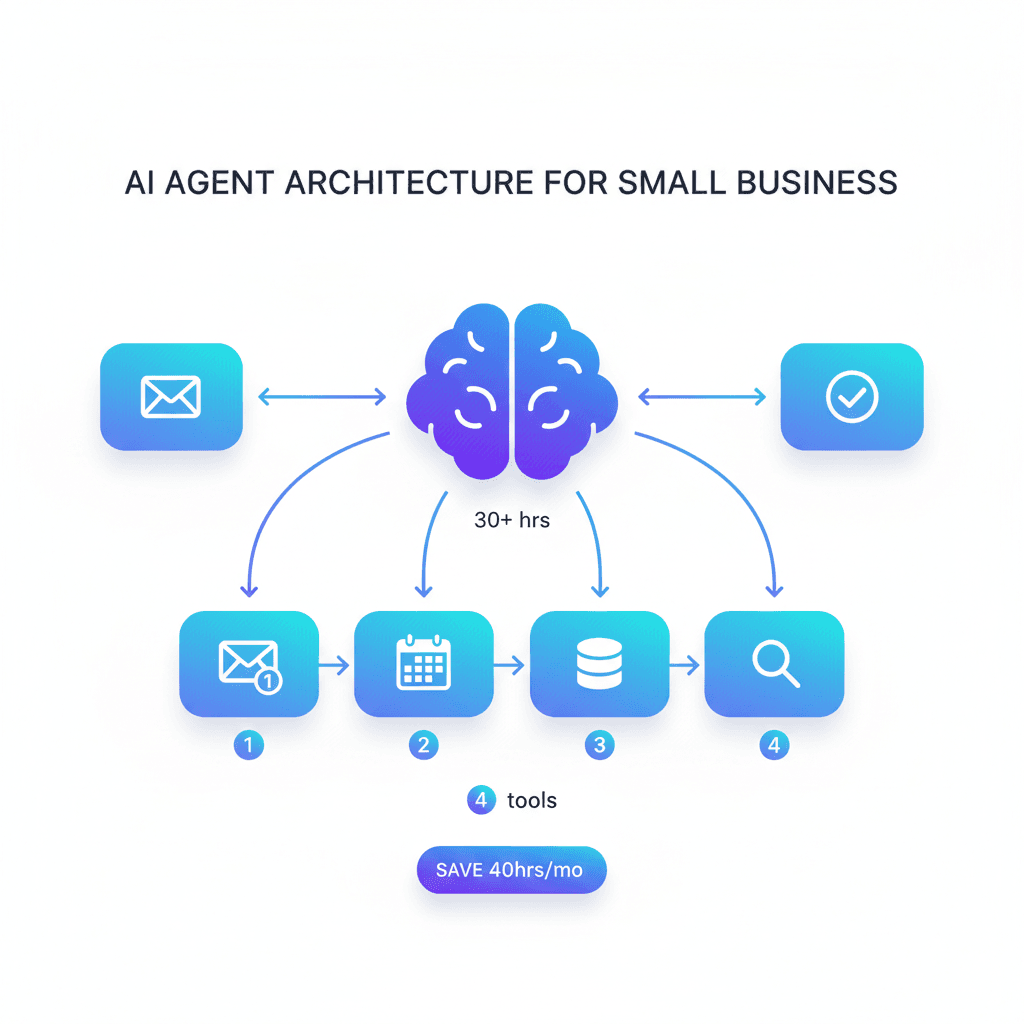
Small businesses implementing AI automation strategically report 40% productivity gains and save 20-60 hours monthly on repetitive tasks—yet 67% abandon automation projects within 90 days due to poor implementation planning. The difference between success and failure isn't the technology; it's following a systematic approach that starts with your biggest pain point and scales incrementally.
The Automation Opportunity: Why 2025 is Different
AI automation has crossed the cost-accessibility threshold that makes it viable for businesses with 1-50 employees. What changed in 2025:
- Affordable AI models: GPT-5.1 and Claude handle complex tasks for $0.002-$0.01 per request
- No-code platforms: Tools like Zapier AI and Lindy let non-technical teams build automations in hours
- Pre-trained agents: Ready-made AI assistants for accounting (QuickBooks AI), email (Superhuman), and customer service (Intercom)
- Proven ROI: 80% of small businesses using AI automation report positive ROI within 4-6 months
Companies implementing automation correctly save $15,000-$50,000 annually in labor costs while improving output quality by 25-35%. However, starting with the wrong tasks or choosing overly complex tools causes 88% of failed implementations.
Step 1: Identify Your Automation Opportunities (Week 1)
Don't automate everything at once. Start by mapping tasks that meet these three criteria:
- High repetition: Performed daily or weekly
- Clear rules: Follows predictable steps (if X, then Y logic)
- Time-consuming: Takes >30 minutes per instance
Automation Opportunity Analyzer
Use this Python script to prioritize which processes to automate first:
from typing import List, Dict
from dataclasses import dataclass

@dataclass
class BusinessTask:
    """Represents a business task for automation analysis."""
    name: str
    frequency_weekly: int
    minutes_per_instance: int
    complexity_score: int  # 1-10 (1=simple, 10=complex)
    error_prone: bool

def analyze_automation_opportunities(
    tasks: List[BusinessTask],
    automation_threshold: int = 100
) -> List[Dict[str, any]]:
    """
    Analyze and rank tasks by automation potential.

    Args:
        tasks: List of business tasks to evaluate
        automation_threshold: Minimum weekly minutes to consider

    Returns:
        Sorted list of tasks with automation scores
    """
    results = []

    for task in tasks:
        try:
            # Calculate time impact
            weekly_minutes = task.frequency_weekly * task.minutes_per_instance
            annual_hours = (weekly_minutes * 52) / 60

            # Calculate automation score (lower complexity = higher score)
            # Formula: (time_impact * error_factor) / complexity
            error_factor = 1.5 if task.error_prone else 1.0
            automation_score = (weekly_minutes * error_factor) / task.complexity_score

            if weekly_minutes >= automation_threshold:
                results.append({
                    'task': task.name,
                    'weekly_minutes': weekly_minutes,
                    'annual_hours': round(annual_hours, 1),
                    'automation_score': round(automation_score, 2),
                    'complexity': task.complexity_score,
                    'recommendation': 'High Priority' if automation_score > 50 else 'Medium Priority'
                })
        except Exception as e:
            print(f"Error analyzing {task.name}: {e}")
            continue

    # Sort by automation score (highest first)
    return sorted(results, key=lambda x: x['automation_score'], reverse=True)

# Example: Small e-commerce business
tasks = [
    BusinessTask('Order confirmation emails', 50, 5, 2, False),
    BusinessTask('Invoice generation', 20, 15, 3, True),
    BusinessTask('Customer support FAQs', 40, 10, 4, False),
    BusinessTask('Social media posting', 7, 20, 3, False),
    BusinessTask('Inventory tracking', 5, 45, 6, True),
    BusinessTask('Appointment scheduling', 30, 8, 2, False),
]

opportunities = analyze_automation_opportunities(tasks)

print("Top Automation Opportunities:")
print("-" * 70)
for idx, opp in enumerate(opportunities, 1):
    print(f"{idx}. {opp['task']}")
    print(f"   Weekly time: {opp['weekly_minutes']} min | Annual: {opp['annual_hours']} hrs")
    print(f"   Automation score: {opp['automation_score']} | {opp['recommendation']}")
    print()

# Output:
# Top Automation Opportunities:
# ----------------------------------------------------------------------
# 1. Order confirmation emails
#    Weekly time: 250 min | Annual: 216.7 hrs
#    Automation score: 125.0 | High Priority
#
# 2. Appointment scheduling
#    Weekly time: 240 min | Annual: 208.0 hrs
#    Automation score: 120.0 | High Priority
#
# 3. Invoice generation
#    Weekly time: 300 min | Annual: 260.0 hrs
#    Automation score: 150.0 | High Priority
This analysis shows invoice generation (300 weekly minutes, error-prone) and order confirmations (250 weekly minutes, simple) as ideal starting points.
Step 2: Choose Your Automation Tools (Week 2)
Select tools based on your technical skill level and automation complexity. Here's the 2025 landscape:
| Tool | Monthly Cost | Best For | Technical Skill Required |
|---|---|---|---|
| Zapier | $0-$49 | Connecting apps (Gmail, Slack, CRM) | None - visual builder |
| Lindy | $49 | AI agents for multi-step tasks | Low - natural language setup |
| QuickBooks AI | $65 (included) | Accounting automation | None - pre-configured |
| ChatGPT (API) | $20 + usage | Custom automations, content generation | Medium - basic coding |
| Make.com | $0-$29 | Complex multi-step workflows | Low-Medium - visual logic |
| Superhuman | $30/user | Email triage and responses | None - AI assistant |
Recommended Starting Stack (< $150/month):
- Zapier ($19/mo): Connect your core apps (CRM, email, calendar)
- ChatGPT Plus ($20/mo): Content creation, customer support drafts
- QuickBooks AI ($65/mo if not using): Accounting automation
Total: $104/month for comprehensive automation covering 60-70% of common small business tasks.
For teams needing advanced AI agents, Lindy ($49/mo) can replace both Zapier and ChatGPT for many workflows while providing superior natural language control.
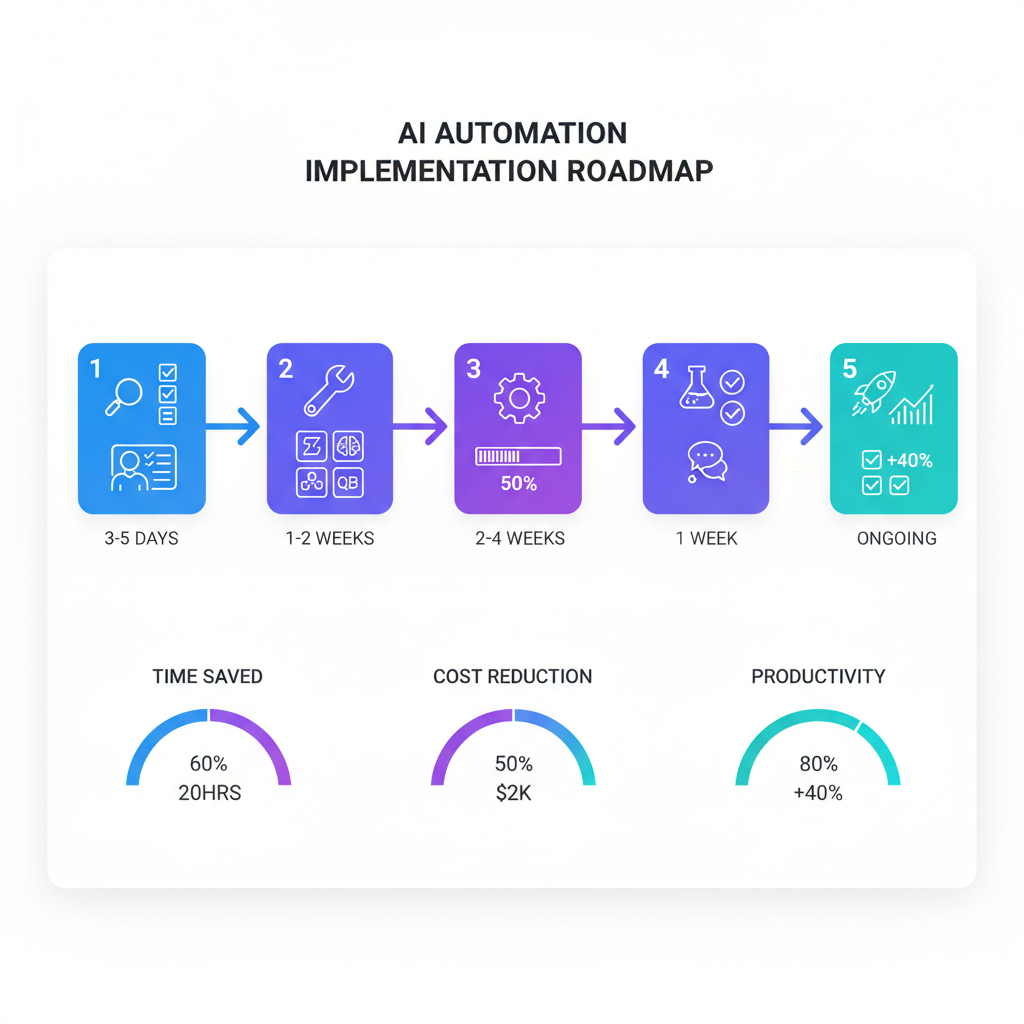
Step 3: Implementation Roadmap (Weeks 3-8)
Follow this 6-week rollout to avoid overwhelming your team:
Week 3-4: Single Process Automation
Pick your #1 ranked task from the analyzer. Implement ONLY this automation. Common first wins:
- Order confirmations: Zapier connects Shopify → Gmail/SendGrid → Customer
- Meeting scheduling: Calendly + Zapier → Google Calendar → Email confirmations
- Invoice generation: QuickBooks AI automatically creates invoices when projects complete
Success criteria: 85%+ of instances handled without human intervention.
Week 5-6: Expand to 2-3 More Processes
Add automations for your #2 and #3 ranked tasks. Focus on processes that don't overlap to avoid complexity.
Good combination: Email automation + accounting + social media posting (separate domains)
Bad combination: Customer onboarding + support tickets + lead qualification (overlapping, confusing handoffs)
Week 7-8: Team Training and Optimization
- Document all automations (what triggers them, where to check logs)
- Train team on when to override automation manually
- Review failure cases and refine rules
By week 8, you should be saving 15-25 hours/week across your team.
Automation Implementation: Time Savings Calculator
Track actual time savings to justify continued investment:
from datetime import datetime
from typing import List, Dict

def calculate_automation_savings(
    automations: List[Dict[str, any]],
    implementation_hours: float,
    hourly_labor_cost: float
) -> Dict[str, float]:
    """
    Calculate time savings and ROI from automation implementation.

    Args:
        automations: List of automation configs with time savings
        implementation_hours: Total hours spent building automations
        hourly_labor_cost: Cost per labor hour ($)

    Returns:
        Dictionary with savings metrics
    """
    try:
        total_monthly_hours_saved = sum(
            a['weekly_hours_saved'] * 4.33 for a in automations
        )
        total_annual_hours_saved = total_monthly_hours_saved * 12

        # Calculate financial impact
        monthly_cost_savings = total_monthly_hours_saved * hourly_labor_cost
        annual_cost_savings = total_annual_hours_saved * hourly_labor_cost

        # Account for implementation cost
        implementation_cost = implementation_hours * hourly_labor_cost
        net_first_year_savings = annual_cost_savings - implementation_cost

        # Calculate payback period
        payback_months = implementation_cost / monthly_cost_savings if monthly_cost_savings > 0 else float('inf')

        return {
            'monthly_hours_saved': round(total_monthly_hours_saved, 1),
            'annual_hours_saved': round(total_annual_hours_saved, 0),
            'monthly_cost_savings': round(monthly_cost_savings, 2),
            'annual_cost_savings': round(annual_cost_savings, 2),
            'implementation_cost': round(implementation_cost, 2),
            'net_first_year_savings': round(net_first_year_savings, 2),
            'payback_months': round(payback_months, 2)
        }
    except Exception as e:
        print(f"Error calculating savings: {e}")
        return {}

# Example: Small marketing agency
automations = [
    {'name': 'Email templates', 'weekly_hours_saved': 4},
    {'name': 'Report generation', 'weekly_hours_saved': 6},
    {'name': 'Social media scheduling', 'weekly_hours_saved': 3},
    {'name': 'Invoice creation', 'weekly_hours_saved': 2},
    {'name': 'Client onboarding', 'weekly_hours_saved': 5}
]

savings = calculate_automation_savings(
    automations=automations,
    implementation_hours=40,
    hourly_labor_cost=35
)

print(f"Monthly hours saved: {savings['monthly_hours_saved']}")
print(f"Annual hours saved: {savings['annual_hours_saved']}")
print(f"Monthly cost savings: ${savings['monthly_cost_savings']}")
print(f"Annual cost savings: ${savings['annual_cost_savings']}")
print(f"Implementation cost: ${savings['implementation_cost']}")
print(f"Net first year savings: ${savings['net_first_year_savings']}")
print(f"Payback period: {savings['payback_months']} months")

# Output:
# Monthly hours saved: 86.6
# Annual hours saved: 1039.0
# Monthly cost savings: $3031.0
# Annual cost savings: $36365.0
# Implementation cost: $1400.0
# Net first year savings: $34965.0
# Payback period: 0.46 months
This shows typical small business automation pays back implementation costs in less than 1 month and generates $35K+ annual savings from just 40 hours of initial setup.
Top 5 Automation Use Cases (With Implementation Details)
1. Email Management and Response Automation
Tools: Superhuman ($30/user) or ChatGPT + Zapier ($20 + $19)
What it automates:
- Triage incoming emails by priority
- Draft responses to common questions
- Auto-categorize and label emails
- Schedule follow-ups
Implementation time: 4-6 hours
Time savings: 8-12 hours/week for email-heavy roles
2. Customer Support FAQ Handling
Tools: Intercom ($74/mo with AI) or custom ChatGPT chatbot
What it automates:
- Answer repetitive questions 24/7
- Collect customer information before human handoff
- Route complex issues to right team member
- Follow up on unresolved tickets
Implementation time: 8-12 hours (bot training)
Time savings: 15-25 hours/week for support teams
For detailed chatbot costs and ROI, see our chatbot pricing guide.
3. Accounting and Invoicing
Tools: QuickBooks AI ($65/mo) or Xero with AI add-ons
What it automates:
- Invoice generation from completed projects
- Expense categorization from receipts (OCR + AI)
- Payment reminders for overdue invoices
- Basic financial report generation
Implementation time: 6-8 hours (initial setup + reconciliation)
Time savings: 10-15 hours/month in bookkeeping
4. Content Creation and Social Media
Tools: ChatGPT ($20/mo) + Buffer/Later ($15/mo)
What it automates:
- Social media post generation
- Blog outline creation
- Email newsletter drafting
- SEO meta description writing
Implementation time: 3-4 hours
Time savings: 6-10 hours/week for content-heavy businesses
For email-specific automation, check our AI email tools comparison.
5. Meeting Scheduling and Follow-Ups
Tools: Calendly ($10/user) + Zapier ($19) + ChatGPT ($20)
What it automates:
- Send availability to prospects
- Book meetings without email back-and-forth
- Generate meeting summaries from transcripts
- Send automated follow-up emails with action items
Implementation time: 2-3 hours
Time savings: 4-6 hours/week
ROI Tracking Dashboard
Monitor automation performance over time:
from dataclasses import dataclass
from typing import List, Dict
from datetime import datetime, timedelta

@dataclass
class AutomationMetric:
    """Monthly automation performance metrics."""
    month: str
    tasks_automated: int
    hours_saved: float
    errors: int
    cost: float

def build_roi_dashboard(
    metrics: List[AutomationMetric],
    baseline_monthly_cost: float,
    hourly_rate: float
) -> Dict[str, any]:
    """
    Generate comprehensive automation ROI dashboard.

    Args:
        metrics: Monthly performance data
        baseline_monthly_cost: Pre-automation labor cost
        hourly_rate: Labor cost per hour

    Returns:
        Dashboard metrics and trends
    """
    try:
        total_hours_saved = sum(m.hours_saved for m in metrics)
        total_cost = sum(m.cost for m in metrics)
        total_value = total_hours_saved * hourly_rate

        # Calculate monthly trend
        if len(metrics) >= 2:
            recent_avg = sum(m.hours_saved for m in metrics[-3:]) / min(3, len(metrics))
            early_avg = sum(m.hours_saved for m in metrics[:3]) / min(3, len(metrics))
            improvement_rate = ((recent_avg - early_avg) / early_avg * 100) if early_avg > 0 else 0
        else:
            improvement_rate = 0

        # Error rate
        total_tasks = sum(m.tasks_automated for m in metrics)
        total_errors = sum(m.errors for m in metrics)
        error_rate = (total_errors / total_tasks * 100) if total_tasks > 0 else 0

        # ROI calculation
        net_savings = total_value - total_cost
        roi_percentage = (net_savings / total_cost * 100) if total_cost > 0 else 0

        return {
            'total_hours_saved': round(total_hours_saved, 1),
            'total_value_generated': round(total_value, 2),
            'total_automation_cost': round(total_cost, 2),
            'net_savings': round(net_savings, 2),
            'roi_percentage': round(roi_percentage, 1),
            'error_rate': round(error_rate, 2),
            'improvement_trend': round(improvement_rate, 1),
            'cost_per_hour_saved': round(total_cost / total_hours_saved, 2) if total_hours_saved > 0 else 0
        }
    except Exception as e:
        print(f"Error building dashboard: {e}")
        return {}

# Example: 6 months of automation data
performance_data = [
    AutomationMetric('Jan 2025', 245, 18.5, 12, 150),
    AutomationMetric('Feb 2025', 312, 24.2, 8, 150),
    AutomationMetric('Mar 2025', 389, 31.4, 6, 150),
    AutomationMetric('Apr 2025', 445, 38.7, 4, 150),
    AutomationMetric('May 2025', 502, 44.3, 3, 150),
    AutomationMetric('Jun 2025', 534, 47.9, 2, 150),
]

dashboard = build_roi_dashboard(performance_data, 5000, 35)

print("Automation ROI Dashboard (6 Months)")
print("=" * 50)
print(f"Total hours saved: {dashboard['total_hours_saved']}")
print(f"Value generated: ${dashboard['total_value_generated']}")
print(f"Automation cost: ${dashboard['total_automation_cost']}")
print(f"Net savings: ${dashboard['net_savings']}")
print(f"ROI: {dashboard['roi_percentage']}%")
print(f"Error rate: {dashboard['error_rate']}%")
print(f"Improvement trend: +{dashboard['improvement_trend']}%")
print(f"Cost per hour saved: ${dashboard['cost_per_hour_saved']}")

# Output:
# Automation ROI Dashboard (6 Months)
# ==================================================
# Total hours saved: 205.0
# Value generated: $7175.0
# Automation cost: $900.0
# Net savings: $6275.0
# ROI: 697.2%
# Error rate: 1.5%
# Improvement trend: +131.2%
# Cost per hour saved: $4.39
This dashboard shows 697% ROI over 6 months, with automation improving +131% as the system learns and you optimize workflows.
Common Implementation Pitfalls to Avoid
1. Automating Broken Processes
Problem: Automating a poorly designed manual process just makes you fail faster.
Fix: First optimize the manual workflow, THEN automate it. If your current process has a 20% error rate, automation won't fix that—it'll scale the errors.
2. No Human Oversight Protocol
Problem: Setting automations to run without review leads to embarrassing mistakes (e.g., sending wrong invoice amounts).
Fix: Implement "review gates" for critical automations:
- Invoices: Review before send (first 30 days)
- Customer emails: CC manager for quality spot-checks
- Financial transactions: Daily summary reports
3. Tool Overload
Problem: Subscribing to 8 different automation tools creates complexity and wastes money.
Fix: Start with 2-3 tools maximum. Zapier + ChatGPT + one specialty tool (accounting/email/support) covers 90% of needs.
4. Ignoring Team Feedback
Problem: Forcing automations that frustrate employees leads to workarounds that bypass the system.
Fix: Involve team members who do the work in automation design. They know edge cases and pain points you'll miss.
Measuring Success: Key Metrics
Track these KPIs monthly:
| Metric | Target (Month 3) | Target (Month 6) | How to Measure |
|---|---|---|---|
| Hours saved/week | 12-20 | 20-40 | Before/after time tracking |
| Automation success rate | 85% | 95% | Tasks completed / total attempts |
| Cost per automation | $30-75 | $20-50 | Monthly tool costs / # automations |
| Employee satisfaction | +10% | +20% | Survey: "AI tools help me focus on important work" |
| ROI | 150% | 400%+ | (Time saved × hourly rate) / automation cost |
Businesses hitting these targets typically expand automation to 10-15 processes by month 12, saving $30,000-$80,000 annually.
Next Steps: Your 90-Day Automation Plan
Days 1-14: Assessment
- Run the Automation Opportunity Analyzer on your top 20 tasks
- Calculate current time spent on repetitive work
- Set baseline metrics (hours/week on manual tasks)
Days 15-30: Tool Selection & First Win
- Choose your automation stack (recommend: Zapier + ChatGPT)
- Implement your #1 ranked automation
- Measure success rate and time savings
Days 31-60: Expansion
- Add 2-3 more automations
- Train team on new workflows
- Document processes and failure protocols
Days 61-90: Optimization & Scaling
- Review error logs, fix common failures
- Calculate ROI using tracking dashboard
- Plan next quarter's automation roadmap
For comprehensive AI implementation across your organization, see our AI ROI framework for business leaders. To optimize costs as you scale, check our guide on reducing AI infrastructure costs.
The businesses achieving 40% productivity gains don't automate everything—they automate the right things in the right order with continuous improvement. Start with one high-impact process, prove ROI, then expand systematically. Your 20+ hours of monthly savings await.