From Prototype to Production: Deploying AI Systems at Scale
Complete guide to taking AI from demo to production. Learn architecture decisions, testing strategies, deployment patterns & scaling challenges.
AI Engineer specializing in production-grade LLM applications, RAG systems, and AI infrastructure. Passionate about building scalable AI solutions that solve real-world problems.
The gap between a working AI prototype and a production-ready system is often underestimated. While building a demo takes hours, creating a robust, scalable production system can take months. This guide walks you through the journey from prototype to production, covering architecture, testing, deployment, and scaling considerations.
The Prototype-to-Production Gap
What Works in Prototypes
- Synchronous processing: Wait for response
- Single model: One size fits all
- No error handling: Happy path only
- Manual testing: "It works on my machine"
- No monitoring: Hope for the best
What Production Requires
- Asynchronous processing: Handle concurrent users
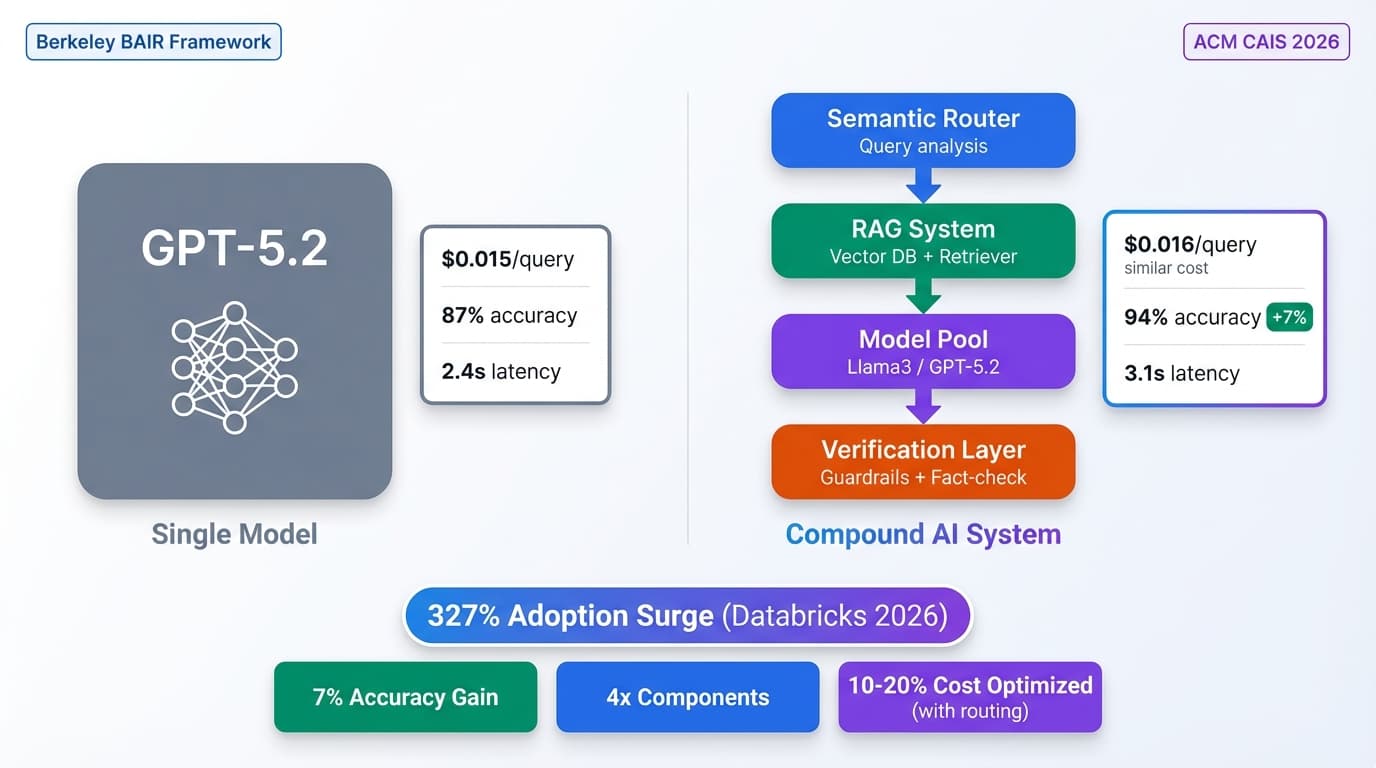
- Multiple models: Right model for the right task
- Comprehensive error handling: Graceful degradation
- Automated testing: CI/CD pipelines
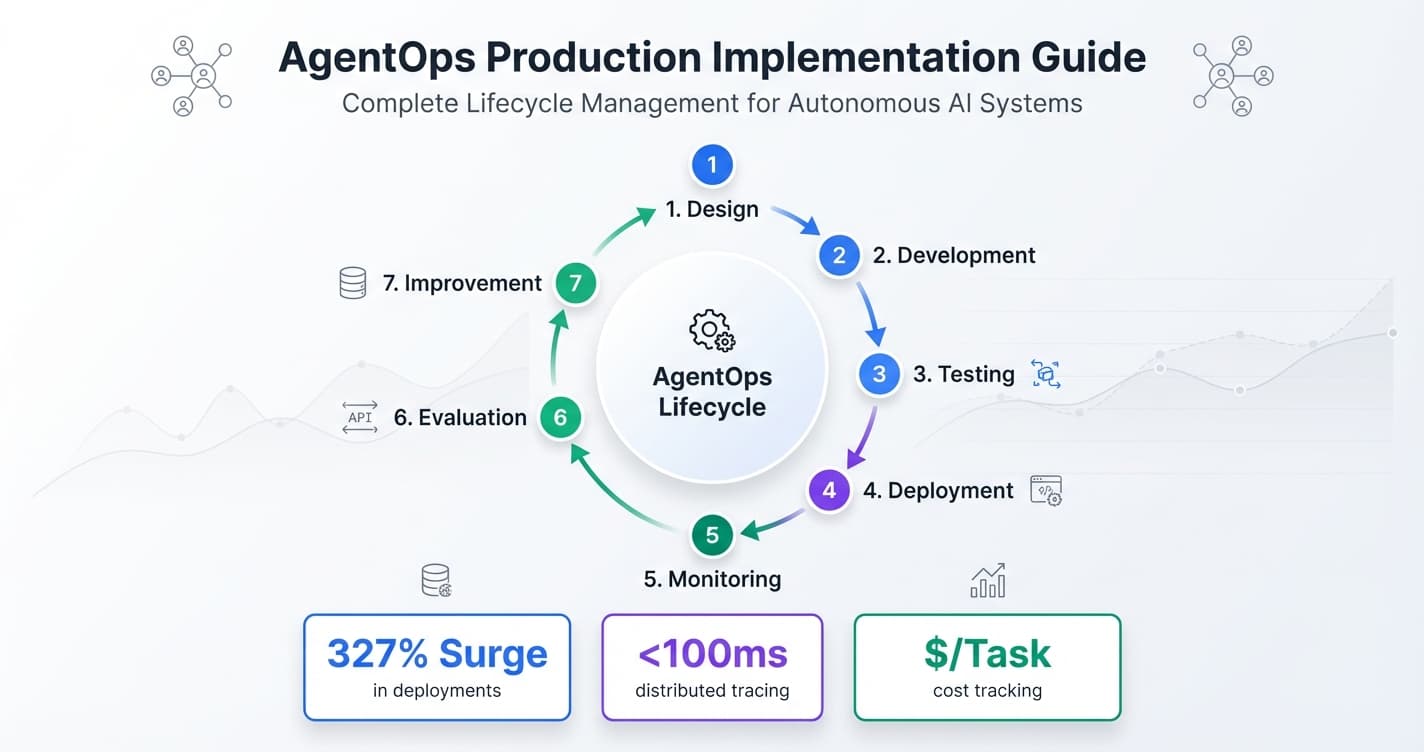
- Full observability: Know what's happening
Phase 1: Production-Ready Architecture
Microservices Pattern
Separate concerns for better scalability:
# API Gateway Service
class APIGateway:
    def __init__(self):
        self.auth_service = AuthService()
        self.rate_limiter = RateLimiter()
        self.model_service = ModelServiceClient()

    async def handle_request(self, request):
        # Authentication
        user = await self.auth_service.validate(request.token)

        # Rate limiting
        if not self.rate_limiter.allow(user.id):
            raise RateLimitError("Too many requests")

        # Route to model service
        response = await self.model_service.process(
            request.data,
            user_id=user.id
        )

        return response

# Model Service
class ModelService:
    def __init__(self):
        self.model_registry = ModelRegistry()
        self.cache = CacheService()
        self.queue = TaskQueue()

    async def process(self, data, user_id):
        # Check cache
        cached = await self.cache.get(data)
        if cached:
            return cached

        # Queue for async processing
        task_id = await self.queue.enqueue(
            'model_inference',
            data=data,
            user_id=user_id
        )

        # Wait for result
        result = await self.queue.wait_for_result(task_id)

        # Cache result
        await self.cache.set(data, result)

        return result
Database Design
Structure data for scale:
from sqlalchemy import Column, String, DateTime, JSON, Index
from sqlalchemy.ext.declarative import declarative_base

Base = declarative_base()

class Conversation(Base):
    __tablename__ = 'conversations'

    id = Column(String, primary_key=True)
    user_id = Column(String, index=True)
    created_at = Column(DateTime, index=True)
    updated_at = Column(DateTime)
    metadata = Column(JSON)

    # Partition by month for large datasets
    __table_args__ = (
        Index('idx_user_created', 'user_id', 'created_at'),
    )

class Message(Base):
    __tablename__ = 'messages'

    id = Column(String, primary_key=True)
    conversation_id = Column(String, index=True)
    role = Column(String)  # user, assistant, system
    content = Column(String)
    tokens = Column(Integer)
    model_version = Column(String)
    created_at = Column(DateTime)

    __table_args__ = (
        Index('idx_conv_created', 'conversation_id', 'created_at'),
    )
Message Queue Integration
Handle async workloads:
from celery import Celery
import redis

app = Celery('ai_tasks', broker='redis://localhost:6379')

@app.task(bind=True, max_retries=3)
def process_llm_request(self, user_input, model_config):
    try:
        # Load model
        model = load_model(model_config)

        # Generate response
        response = model.generate(user_input)

        # Store result
        store_result(response)

        return response

    except Exception as exc:
        # Retry with exponential backoff
        raise self.retry(exc=exc, countdown=2 ** self.request.retries)

# Enqueue task
task = process_llm_request.delay(user_input, config)

# Check status
result = task.get(timeout=30)
Phase 2: Comprehensive Testing
Unit Tests for AI Components
import pytest
from unittest.mock import Mock, patch

def test_prompt_construction():
    builder = PromptBuilder()

    prompt = builder.build(
        template="Answer: {question}",
        question="What is AI?"
    )

    assert "What is AI?" in prompt
    assert len(prompt) < 1000  # Token limit

def test_response_parsing():
    parser = ResponseParser()

    response = '{"answer": "test", "confidence": 0.9}'
    parsed = parser.parse(response)

    assert parsed['answer'] == "test"
    assert 0 <= parsed['confidence'] <= 1

@patch('model_client.generate')
def test_error_handling(mock_generate):
    mock_generate.side_effect = APIError("Rate limit")

    client = AIClient()

    with pytest.raises(APIError):
        client.process("test input")

    # Verify retry logic
    assert mock_generate.call_count == 3  # Default retries
Integration Tests
@pytest.mark.integration
async def test_end_to_end_flow():
    # Setup
    client = APIClient(base_url=TEST_URL)

    # Make request
    response = await client.post('/chat', json={
        'message': 'Hello, AI!',
        'user_id': 'test_user_123'
    })

    # Verify response
    assert response.status_code == 200
    assert 'reply' in response.json()
    assert len(response.json()['reply']) > 0

    # Verify database state
    messages = await get_messages('test_user_123')
    assert len(messages) == 2  # User message + AI reply

@pytest.mark.integration
async def test_rate_limiting():
    client = APIClient()

    # Send many requests quickly
    tasks = [
        client.post('/chat', json={'message': f'Message {i}'})
        for i in range(100)
    ]

    responses = await asyncio.gather(*tasks, return_exceptions=True)

    # Some should be rate limited
    rate_limited = sum(
        1 for r in responses
        if isinstance(r, Exception) or r.status_code == 429
    )

    assert rate_limited > 0
Load Testing
from locust import HttpUser, task, between

class AIUser(HttpUser):
    wait_time = between(1, 3)

    @task(3)  # Weight: 3x more common

    def simple_query(self):
        self.client.post('/chat', json={

            'message': 'Simple question',
            'user_id': f'user_{self.user_id}'
        })

    @task(1)
    def complex_query(self):
        self.client.post('/chat', json={
            'message': 'Complex analytical question ' * 20,
            'user_id': f'user_{self.user_id}'
        })

# Run: locust -f load_test.py --users 1000 --spawn-rate 10
Phase 3: Deployment Strategies
Blue-Green Deployment
Zero-downtime updates:
class BlueGreenDeployer:
    def __init__(self, load_balancer):
        self.lb = load_balancer
        self.blue = ModelService('blue')
        self.green = ModelService('green')
        self.active = 'blue'

    async def deploy_new_version(self, new_model):
        # Deploy to inactive environment
        inactive = 'green' if self.active == 'blue' else 'blue'
        inactive_service = self.green if inactive == 'green' else self.blue

        # Update inactive environment
        await inactive_service.update_model(new_model)

        # Run smoke tests
        if not await self.smoke_test(inactive_service):
            raise DeploymentError("Smoke tests failed")

        # Switch traffic
        await self.lb.switch_traffic(inactive)
        self.active = inactive

        logger.info(f"Deployed new version to {inactive}")

    async def smoke_test(self, service):
        test_cases = [
            "Simple query",
            "Complex query",
            "Edge case query"
        ]

        for test in test_cases:
            response = await service.process(test)
            if not self.validate_response(response):
                return False

        return True
Canary Deployment
Gradual rollout:
class CanaryDeployer:
    def __init__(self):
        self.stable_model = load_model('stable')
        self.canary_model = load_model('canary')
        self.canary_percentage = 0

    async def process_request(self, request):
        # Route based on canary percentage
        if random.random() < self.canary_percentage:
            model = self.canary_model
            version = 'canary'
        else:
            model = self.stable_model
            version = 'stable'

        response = await model.process(request)

        # Log for analysis
        self.log_metrics(version, request, response)

        return response

    async def increase_canary_traffic(self):
        # Gradually increase canary traffic
        steps = [0.05, 0.10, 0.25, 0.50, 1.0]

        for percentage in steps:
            self.canary_percentage = percentage
            logger.info(f"Canary traffic: {percentage*100}%")

            # Wait and monitor
            await asyncio.sleep(300)  # 5 minutes

            # Check metrics
            if not self.metrics_healthy():
                # Rollback
                self.canary_percentage = 0
                raise DeploymentError("Metrics degraded")

        # Full rollout successful
        self.stable_model = self.canary_model
Phase 4: Scaling Strategies
Horizontal Scaling
Add more instances:
# Kubernetes deployment configuration
apiVersion: apps/v1
kind: Deployment
metadata:
  name: ai-model-service
spec:
  replicas: 5  # Multiple instances
  selector:
    matchLabels:
      app: ai-model
  template:
    spec:
      containers:
      - name: model-server
        image: ai-model:latest
        resources:
          requests:
            memory: "4Gi"
            cpu: "2"
          limits:
            memory: "8Gi"
            cpu: "4"
        env:
        - name: MODEL_PATH
          value: "/models/latest"

---
apiVersion: autoscaling/v2
kind: HorizontalPodAutoscaler
metadata:
  name: ai-model-hpa
spec:
  scaleTargetRef:
    apiVersion: apps/v1
    kind: Deployment
    name: ai-model-service
  minReplicas: 3
  maxReplicas: 20
  metrics:
  - type: Resource
    resource:
      name: cpu
      target:
        type: Utilization
        averageUtilization: 70
Load Balancing
Distribute requests efficiently:
class SmartLoadBalancer:
    def __init__(self, workers):
        self.workers = workers
        self.metrics = defaultdict(lambda: {
            'active_requests': 0,
            'avg_latency': 0,
            'success_rate': 1.0
        })

    def select_worker(self):
        # Weighted round-robin based on performance
        scores = []

        for worker in self.workers:
            metrics = self.metrics[worker.id]

            # Lower is better
            score = (
                metrics['active_requests'] * 1.0 +
                metrics['avg_latency'] / 1000 +
                (1 - metrics['success_rate']) * 10
            )

            scores.append((score, worker))

        # Select worker with best score
        best_worker = min(scores, key=lambda x: x[0])[1]

        return best_worker

    async def route_request(self, request):
        worker = self.select_worker()

        self.metrics[worker.id]['active_requests'] += 1

        try:
            start = time.time()
            response = await worker.process(request)
            latency = (time.time() - start) * 1000

            # Update metrics
            self.update_metrics(worker.id, latency, success=True)

            return response

        except Exception as e:
            self.update_metrics(worker.id, 0, success=False)
            raise

        finally:
            self.metrics[worker.id]['active_requests'] -= 1
Connection Pooling
Reuse connections:
from aiohttp import ClientSession, TCPConnector

class ConnectionPool:
    def __init__(self, max_connections=100):
        self.connector = TCPConnector(
            limit=max_connections,
            ttl_dns_cache=300
        )
        self.session = None

    async def __aenter__(self):
        self.session = ClientSession(connector=self.connector)
        return self.session

    async def __aexit__(self, *args):
        await self.session.close()

# Usage
pool = ConnectionPool(max_connections=100)

async with pool as session:
    tasks = [
        session.post(url, json=data)
        for data in batch
    ]
    responses = await asyncio.gather(*tasks)
Phase 5: Monitoring and Alerting
Health Checks
from fastapi import FastAPI, Response
import psutil

app = FastAPI()

@app.get("/health")
async def health_check():
    checks = {
        'model_loaded': model is not None,
        'database_connected': await db.is_connected(),
        'cache_available': await cache.ping(),
        'memory_ok': psutil.virtual_memory().percent < 90,
        'cpu_ok': psutil.cpu_percent() < 80
    }

    all_healthy = all(checks.values())
    status_code = 200 if all_healthy else 503

    return Response(
        content=json.dumps(checks),
        status_code=status_code
    )

@app.get("/ready")
async def readiness_check():
    # Check if service can handle requests
    if model is None:
        return Response(status_code=503)

    return Response(status_code=200)
Alerts and Notifications
from datadog import statsd

class AlertManager:
    def __init__(self):
        self.alert_configs = {
            'high_latency': {'threshold': 2000, 'window': 300},
            'high_error_rate': {'threshold': 0.05, 'window': 60},
            'low_cache_hit_rate': {'threshold': 0.3, 'window': 3600}
        }

    def check_metrics(self, metrics):
        for alert_name, config in self.alert_configs.items():
            if self.should_alert(metrics, alert_name, config):
                self.send_alert(alert_name, metrics)

    def should_alert(self, metrics, alert_name, config):
        # Check if metric exceeds threshold
        current_value = metrics.get(alert_name, 0)
        threshold = config['threshold']

        return current_value > threshold

    def send_alert(self, alert_name, metrics):
        # Send to Slack, PagerDuty, etc.
        message = f"🚨 ALERT: {alert_name}\n"
        message += f"Current value: {metrics.get(alert_name)}\n"
        message += f"Threshold: {self.alert_configs[alert_name]['threshold']}"

        send_slack_message(message)
        statsd.increment(f'alerts.{alert_name}')
Common Production Challenges
Challenge 1: Cold Starts
Problem: First request takes too long
Solution: Keep models warm
# Background task to keep models warm
async def keep_models_warm():
    while True:
        for model in model_registry.all_models():
            # Send warmup request
            await model.process("warmup query")

        await asyncio.sleep(300)  # Every 5 minutes
Challenge 2: Memory Leaks
Problem: Memory usage grows over time
Solution: Monitor and restart
def check_memory_usage():
    process = psutil.Process()
    memory_mb = process.memory_info().rss / 1024 / 1024

    if memory_mb > MAX_MEMORY_MB:
        logger.error(f"Memory limit exceeded: {memory_mb}MB")
        # Graceful shutdown and restart
        initiate_graceful_shutdown()
Challenge 3: Rate Limit Handling
Problem: External APIs rate limit your requests
Solution: Implement backoff and queuing
from ratelimit import limits, sleep_and_retry

@sleep_and_retry
@limits(calls=100, period=60)  # 100 calls per minute
async def call_external_api(request):
    response = await external_api.call(request)
    return response
Conclusion
Moving from prototype to production is a journey that requires careful attention to architecture, testing, deployment, and monitoring. By following these patterns and best practices, you can build AI systems that are reliable, scalable, and maintainable.
Remember: production readiness is an ongoing process. Continuously monitor, test, and improve your systems based on real-world usage patterns and feedback.
Key Takeaways
- Design microservices architecture for scalability and maintainability
- Implement comprehensive testing at all levels (unit, integration, load)
- Use gradual deployment strategies (canary, blue-green)
- Plan for horizontal scaling from day one
- Monitor everything and set up proactive alerting
- Handle common challenges (cold starts, memory leaks, rate limits)
- Iterate continuously based on production metrics