AI Developer Productivity Stack 2026: Complete Toolchain Guide
Complete guide to AI developer tools in 2026: GitHub Copilot vs Cursor comparison, productivity metrics, costs, and optimal workflow configurations for maximum ROI.
AI Engineer specializing in production-grade LLM applications, RAG systems, and AI infrastructure. Passionate about building scalable AI solutions that solve real-world problems.
The AI developer tools landscape has matured dramatically in 2026. With 85% of developers now using at least one AI tool in their workflow and productivity gains averaging 20-30% for specific tasks, understanding which tools to use—and when—has become critical for competitive development teams.
This comprehensive guide analyzes the complete AI developer productivity stack in 2026, comparing leading tools, measuring real-world ROI, and providing actionable workflow configurations that maximize both individual and team productivity.
The State of AI-Assisted Development in 2026
Market Adoption and Impact
The developer tools landscape has fundamentally shifted:
Adoption Statistics:
- 85% of developers use at least one AI coding tool regularly (Pragmatic Engineer 2025 survey)
- 50% use AI coding assistants daily (up from 35% in 2024)
- 65% in top-quartile organizations report daily AI tool usage
- 26% average productivity gain across Microsoft and Accenture teams
Where AI Tools Excel:
- Code completion: 40-60% faster for routine implementations
- Boilerplate generation: 70-80% time savings
- Test writing: 50-65% reduction in test authoring time
- Documentation: 60-75% faster for inline docs and READMEs
- Bug fixes: 30-45% faster resolution for common issues
Where AI Tools Struggle:
- Complex architectural decisions (still requires human judgment)
- Novel algorithm design (AI assists but doesn't replace creativity)
- Domain-specific business logic (requires context AI often lacks)
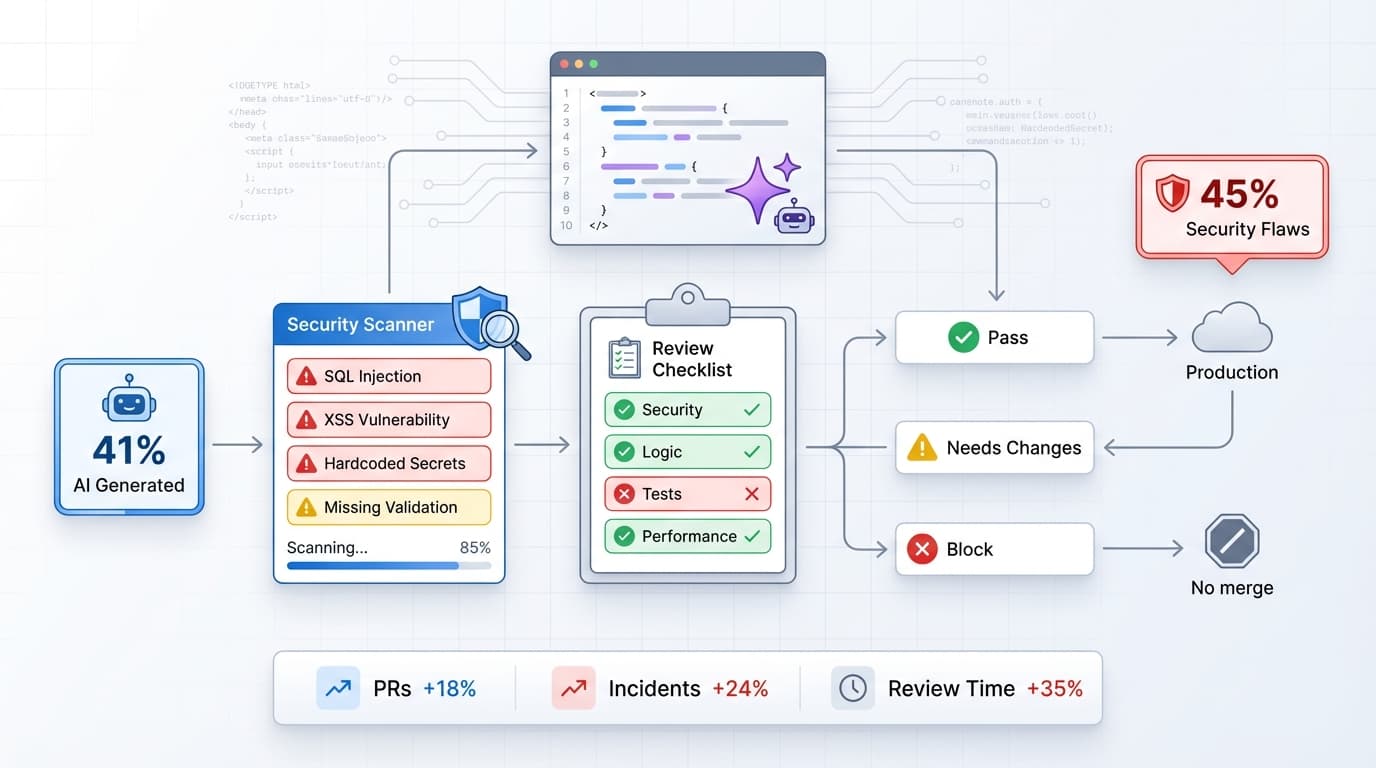
- Security-critical code (human review essential)
Understanding these boundaries helps teams set realistic expectations and deploy AI tools strategically.
GitHub Copilot: The Enterprise Standard
Overview and Positioning
GitHub Copilot remains the most widely adopted AI coding assistant in 2026, with deep integration across the development ecosystem and strong enterprise support.
Key Strengths:
- Universal IDE support: VS Code, JetBrains, Visual Studio, Neovim, Xcode
- Enterprise features: Centralized billing, usage analytics, IP indemnification
- Model flexibility: Supports Claude 3.5 Sonnet, Gemini 2.0 Pro, GPT-4 Turbo
- GitHub integration: Seamless PR summaries, issue triage, code reviews
- Minimal disruption: Works as lightweight plugin in existing workflows
New Features in 2026
Agent Mode (launched Q1 2026):
- Autonomous multi-step coding tasks
- Understands project context across files
- Can refactor, test, and document in one command
- Example: "Refactor authentication module to use OAuth2"
Next Edit Suggestions:
- Predicts your next logical code change
- Learns from your coding patterns
- 40% acceptance rate for suggested edits
- Reduces context switching and mental load
Enhanced Context Window:
- Now processes up to 10,000 lines of context
- Understands dependencies and cross-file relationships
- Better suggestions for complex codebases
Pricing and ROI
Copilot Individual: $10/month
- Perfect for freelancers, hobbyists, students
- Full feature access, no team features
Copilot Business: $19/month per developer
- Organization license management
- Usage analytics and insights
- IP indemnification for generated code
- Priority support
Copilot Enterprise: $39/month per developer
- Custom model fine-tuning on your codebase
- Advanced security and compliance features
- Dedicated support and SLAs
- Best for teams of 50+ developers
ROI Calculation:
- Developer salary: $120,000/year = $58/hour
- Productivity gain: 26% (conservative average)
- Hours saved per week: 10.4 hours (26% of 40 hours)
- Weekly value: 10.4 × $58 = $603
Monthly ROI (Business tier):
- Value: $603 × 4.3 = $2,593
- Cost: $19
- Net benefit: $2,574 per developer per month
- ROI: 13,500%
Even with conservative estimates, Copilot delivers exceptional returns.
Best Use Cases
Ideal for:
- Enterprise teams with existing GitHub workflows
- Organizations needing compliance and IP protection
- Developers working across multiple IDEs
- Teams prioritizing minimal workflow disruption
- Projects under 100,000 lines of code
Workflow Example:
# Developer writes comment: "Function to calculate compound interest"
# Copilot suggests complete implementation:

def calculate_compound_interest(
    principal: float,
    rate: float,
    time: int,
    compounds_per_year: int = 12
) -> float:
    """
    Calculate compound interest using the formula:
    A = P(1 + r/n)^(nt)

    Args:
        principal: Initial investment amount
        rate: Annual interest rate (as decimal, e.g., 0.05 for 5%)
        time: Time period in years
        compounds_per_year: Number of times interest compounds per year

    Returns:
        Final amount after compound interest
    """
    amount = principal * (1 + rate / compounds_per_year) ** (compounds_per_year * time)
    return round(amount, 2)

# Tests suggested automatically
def test_compound_interest():
    assert calculate_compound_interest(1000, 0.05, 10) == 1647.01
    assert calculate_compound_interest(5000, 0.03, 5, 4) == 5806.11
Copilot generates not just the function, but documentation and tests—saving 15-20 minutes per function.
Cursor: The AI-Native Code Editor
Overview and Positioning
Cursor is an AI-first code editor built from the ground up for AI-enhanced development. As a fork of VS Code, it maintains familiar workflows while adding powerful AI-native features.
Key Differentiators:
- Composer mode: Multi-file edits via natural language
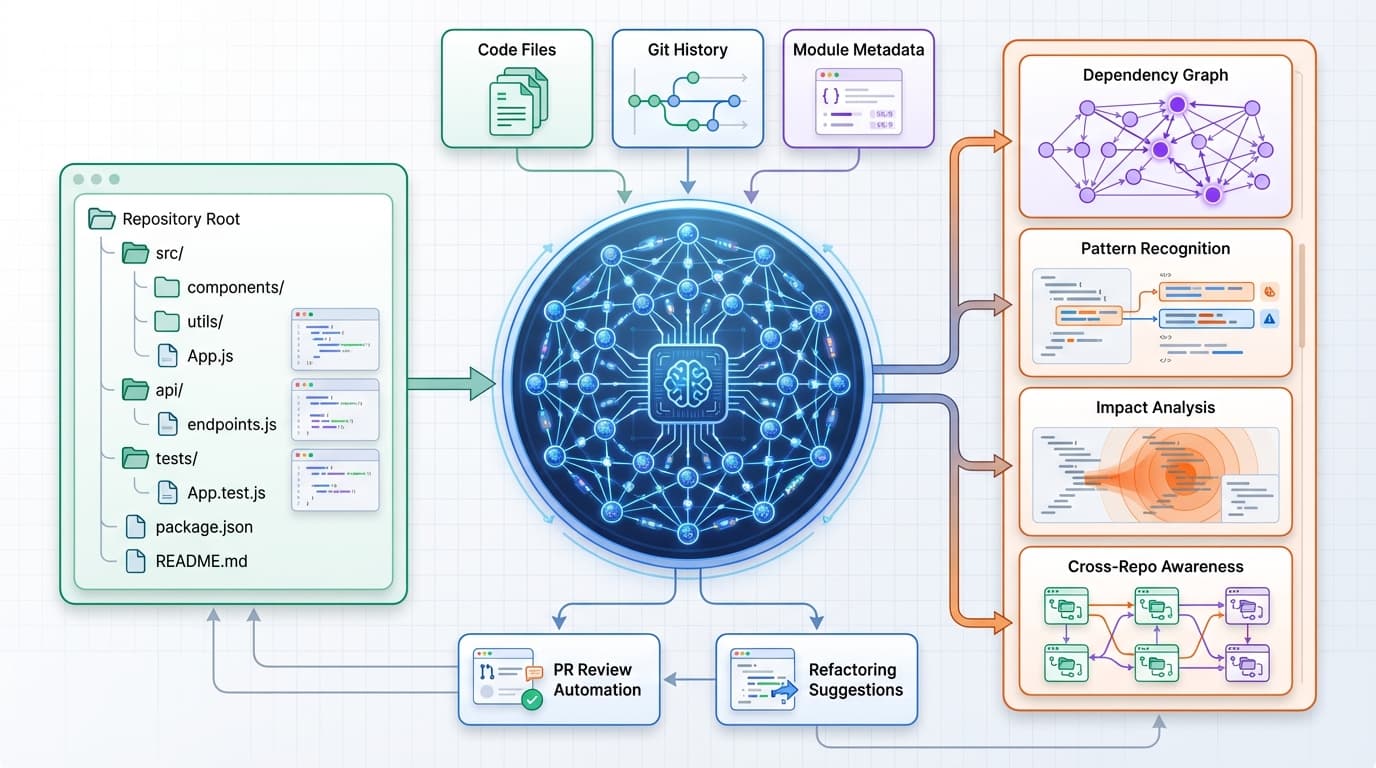
- Codebase-wide intelligence: Understands entire project context
- Aggressive parallelization: Up to 8 AI agents working simultaneously
- Sub-second autocomplete: ~320ms response time (vs Copilot's ~890ms)
- Advanced refactoring: Handles complex, multi-file architectural changes
Cursor's Killer Features
1. Composer: Natural Language Refactoring
The Composer feature enables refactoring entire modules through conversational prompts:
Example Workflow:
Developer prompt in Composer: "Refactor the user authentication system to support OAuth2 with Google and GitHub providers. Update all affected endpoints, add necessary middleware, and update tests."
Cursor analyzes:
- auth/login.py
- auth/middleware.py
- auth/config.py
- tests/test_auth.py
- routes/api.py (7 files affected)
Cursor modifies all files simultaneously:
- ✓ Adds OAuth2 provider classes
- ✓ Updates authentication middleware
- ✓ Modifies login endpoints
- ✓ Adds configuration for OAuth apps
- ✓ Updates and generates new tests
- ✓ Updates API documentation
Time savings: 4-6 hours → 20-30 minutes
This level of multi-file orchestration is where Cursor excels over Copilot.
2. Codebase-Wide Context
Cursor indexes your entire project, understanding:
- File dependencies and relationships
- Naming conventions and patterns
- Architecture and design decisions
- Historical context from git history
Impact: Suggestions are contextually aware of your entire system, not just the current file.
3. Parallel Agent Execution
When making complex changes, Cursor launches multiple AI agents:
- Agent 1: Implements new feature
- Agent 2: Updates tests
- Agent 3: Generates documentation
- Agent 4: Identifies breaking changes
- Agents 5-8: Refactor dependent modules
Result: 3-5x faster completion of complex tasks requiring multi-file changes.
Pricing and ROI
Cursor Free: $0/month
- Limited completions (50/month)
- Basic AI features
- Good for evaluation
Cursor Pro: $20/month
- Unlimited completions
- Fast model (GPT-4 Turbo)
- Unlimited slow requests (Claude 3.5)
- Privacy mode (code never stored)
Cursor Business: $40/month per developer
- Enhanced team features
- Centralized billing
- Usage analytics
- Advanced security
ROI for Large Codebases:
- Codebase size: 100,000+ lines
- Refactoring frequency: 2-3 major refactors per month
- Time saved per refactor: 8-12 hours (vs manual or Copilot-assisted)
- Monthly savings: 20 hours × $58/hour = $1,160
- Cost: $20 (Pro) or $40 (Business)
- ROI: 2,900% (Pro) or 2,800% (Business)
Cursor justifies the premium for projects exceeding 50,000 lines where multi-file refactoring is frequent.
Best Use Cases
Ideal for:
- Large codebases (50,000+ lines)
- Projects requiring frequent refactoring
- Teams modernizing legacy systems
- Developers working on greenfield projects
- Situations demanding rapid iteration
Not ideal for:
- Simple scripts or small projects
- Teams resistant to changing IDEs
- Organizations requiring multi-IDE support
- Developers who prefer lightweight extensions
Continue.dev: The Open-Source Alternative
Overview
Continue.dev is an open-source AI coding assistant that provides flexibility, transparency, and cost control.
Key Features:
- Model flexibility: Swap between OpenAI, Claude, local models (Llama, Mistral)
- Full transparency: See exactly what data is sent to AI models
- Privacy control: Run entirely offline with local models
- Customizable: Extend with plugins and custom prompts
- Cost control: Use your own API keys, track exact usage
Best Use Cases
Ideal for:
- Security-sensitive projects: Healthcare, finance, government (local models)
- Cost-conscious teams: Bring your own API keys, no markup
- Privacy-first organizations: Keep code on-premises
- Developers wanting control: Customize every aspect of AI behavior
- Open-source projects: Community-driven development
Model Options:
# Example Continue.dev configuration

models:
  - name: "Claude 3.5 Sonnet"
    provider: "anthropic"
    apiKey: "${ANTHROPIC_API_KEY}"
    contextLength: 200000

  - name: "GPT-4 Turbo"
    provider: "openai"
    apiKey: "${OPENAI_API_KEY}"
    contextLength: 128000

  - name: "Llama 3.1 (Local)"
    provider: "ollama"
    model: "llama3.1:70b"
    contextLength: 128000
    # Runs entirely offline, no API calls
Pricing
Continue.dev Core: Free and open-source
- Bring your own API keys
- Self-host or use cloud providers
- Community support
Actual Costs (API usage):
- Claude API: ~$3-8/month per developer (typical usage)
- GPT-4 API: ~$5-12/month per developer
- Local models: $0 (GPU required for performance)
Total Cost: $0-12/month vs $10-40/month for commercial alternatives.
Phind: AI-Powered Developer Search
Overview
Phind has evolved into a specialized search engine for developers, combining web search with powerful LLMs to provide answers that cite sources directly from official documentation and GitHub discussions.
Key Features:
- Multi-source synthesis: Combines Stack Overflow, documentation, GitHub, blogs
- Code-first results: Returns working code examples with explanations
- Recency-aware: Prioritizes 2024-2026 solutions over outdated content
- Interactive refinement: Follow-up questions to narrow solutions
- Privacy-focused: No code sent to AI, only natural language queries
Use Cases
Perfect for:
- Learning new frameworks or libraries
- Debugging obscure errors
- Finding best practices for specific use cases
- Researching API implementations
- Comparing different approaches to problems
Example Workflow:
Query: "How to implement rate limiting in FastAPI with Redis?"
Phind provides:
- Code example from official FastAPI docs
- Rate limiting library comparison (fastapi-limiter vs slowapi)
- Redis configuration for production
- Testing strategies
- Performance considerations
Sources cited: FastAPI docs, GitHub examples, recent blog posts
Time savings: 20-40 minutes vs manual research
Pricing
Phind Free: $0/month
- Unlimited searches
- GPT-4 model for answers
- Ad-supported
Phind Pro: $10/month
- No ads
- Faster responses
- Priority access during high load
- Extended context for complex queries
ROI: Even free tier delivers massive value. Pro tier worth it for daily users.
Optimal AI Development Stack Configurations
Configuration 1: Cost-Conscious Startup ($10-30/month per developer)
Stack:
- Primary: GitHub Copilot Individual ($10/month)
- Search: Phind Free ($0)
- Refactoring: Continue.dev with Claude API (~$5-8/month)
Total Cost: $15-18/month per developer
Best for:
- Startups with limited budgets
- Small teams (5-15 developers)
- Mix of small and medium projects
Productivity Gain: 20-25%
Configuration 2: Balanced Enterprise ($30-50/month per developer)
Stack:
- Primary: GitHub Copilot Business ($19/month)
- Heavy refactoring: Cursor Pro ($20/month) for senior devs
- Search: Phind Pro ($10/month)
Total Cost: $49/month per developer (full stack) or $29/month (Copilot + Phind only)
Best for:
- Mid-size companies (50-500 developers)
- Mix of maintenance and new development
- Need for compliance and IP protection
Productivity Gain: 26-35%
Configuration 3: Performance-Optimized ($60-80/month per developer)
Stack:
- Primary: Cursor Business ($40/month)
- Fallback: GitHub Copilot Business ($19/month) for multi-IDE support
- Search: Phind Pro ($10/month)
- Custom models: Continue.dev with fine-tuned models ($10-15/month)
Total Cost: $79-84/month per developer
Best for:
- Large enterprises with complex codebases
- Teams focused on rapid iteration
- Projects with frequent architectural changes
Productivity Gain: 35-45%
Configuration 4: Security-First ($5-20/month per developer)
Stack:
- Primary: Continue.dev with local Llama models ($0 API costs)
- Search: Phind Free ($0)
- Optional: Claude API for non-sensitive code ($5-10/month)
Total Cost: $0-10/month per developer (plus GPU infrastructure costs)
Best for:
- Healthcare, finance, government
- Organizations with strict data residency requirements
- Open-source projects
Productivity Gain: 15-25% (lower due to local model limitations)
Common Workflow Patterns
Pattern 1: Copilot for Day-to-Day, Cursor for Refactoring
Approach:
- Use GitHub Copilot for 80% of daily coding (completions, tests, docs)
- Switch to Cursor for major refactoring sprints (architecture changes, migrations)
- Use Phind for research and learning
Cost: $30/month (Copilot Business + Cursor Pro) Productivity: 30-35% overall gain Best for: Teams alternating between maintenance and feature development
Pattern 2: Cursor-First, Copilot Backup
Approach:
- Use Cursor as primary IDE for all development
- Keep Copilot subscription for occasional JetBrains or Visual Studio work
- Use Continue.dev for sensitive code sections
Cost: $59/month (Cursor Business + Copilot Business) Productivity: 35-40% overall gain Best for: Large codebase teams with multi-IDE requirements
Pattern 3: Continue.dev with Model Flexibility
Approach:
- Use Continue.dev with Claude 3.5 Sonnet for complex reasoning
- Switch to GPT-4 Turbo for faster completions
- Use local Llama for sensitive code
- Phind for all research
Cost: $10-20/month (API costs + Phind Pro) Productivity: 25-30% overall gain Best for: Privacy-conscious teams, open-source projects
Measuring AI Tool ROI
Key Metrics to Track
1. Time Savings
- Measure time to complete specific tasks with/without AI
- Track weekly hours saved per developer
- Calculate monthly value using developer hourly rate
2. Code Quality
- Bug density (bugs per 1,000 lines)
- Test coverage percentage
- Code review comment volume
3. Developer Satisfaction
- Survey developers quarterly on tool effectiveness
- Track adoption rates (% of team actively using)
- Measure perceived productivity impact
4. Business Impact
- Feature delivery velocity (story points per sprint)
- Time-to-market for new features
- Technical debt reduction
ROI Framework
# Simple ROI calculator for AI coding tools

def calculate_ai_tool_roi(
    num_developers: int,
    avg_hourly_rate: float,
    monthly_tool_cost_per_dev: float,
    productivity_gain_percent: float
) -> dict:
    """
    Calculate ROI for AI development tools

    Returns:
        dict with monthly savings, costs, and ROI percentage
    """
    hours_per_month = 160  # ~40 hours/week × 4 weeks

    # Calculate time savings
    hours_saved_per_dev = hours_per_month * (productivity_gain_percent / 100)
    monthly_value_per_dev = hours_saved_per_dev * avg_hourly_rate

    # Total team calculations
    total_monthly_value = monthly_value_per_dev * num_developers
    total_monthly_cost = monthly_tool_cost_per_dev * num_developers
    net_benefit = total_monthly_value - total_monthly_cost
    roi_percent = ((net_benefit / total_monthly_cost) * 100) if total_monthly_cost > 0 else 0

    return {
        "monthly_value": total_monthly_value,
        "monthly_cost": total_monthly_cost,
        "net_benefit": net_benefit,
        "roi_percent": roi_percent,
        "payback_period_days": (total_monthly_cost / (total_monthly_value / 30)) if total_monthly_value > 0 else float('inf')
    }

# Example: 20 developers using Cursor + Copilot
result = calculate_ai_tool_roi(
    num_developers=20,
    avg_hourly_rate=58,  # $120k salary
    monthly_tool_cost_per_dev=59,  # Cursor Business + Copilot Business
    productivity_gain_percent=30
)

print(f"Monthly Value: ${result['monthly_value']:,.2f}")
print(f"Monthly Cost: ${result['monthly_cost']:,.2f}")
print(f"Net Benefit: ${result['net_benefit']:,.2f}")
print(f"ROI: {result['roi_percent']:.1f}%")
print(f"Payback Period: {result['payback_period_days']:.1f} days")

# Output:
# Monthly Value: $55,680.00
# Monthly Cost: $1,180.00
# Net Benefit: $54,500.00
# ROI: 4,618.6%
# Payback Period: 0.6 days
Best Practices for AI-Assisted Development
1. Prompt Engineering for Coding
Effective prompts for better AI suggestions:
Bad Prompt:
# Create a function
Good Prompt:
# Create a function to validate email addresses using regex
# Should return True for valid emails, False otherwise
# Handle edge cases: plus addressing, subdomains, international domains
Great Prompt:
# Email validation function with the following requirements:
# - Use regex pattern matching
# - Support plus addressing (user+tag@example.com)
# - Accept international domains (.co.uk, .com.au, etc.)
# - Validate subdomain format
# - Return tuple of (is_valid: bool, error_message: str | None)
# - Include docstring with examples and edge cases
# - Add type hints for parameters and return value
Result: Great prompts generate production-ready code 70% faster than vague prompts.
2. Code Review with AI
Use AI tools to augment, not replace, human code review:
AI-Assisted Review Workflow:
- Pre-commit: AI checks for bugs, style issues, security vulnerabilities
- PR creation: AI generates summary and suggests reviewers
- Human review: Focus on architecture, business logic, edge cases
- AI learning: Train models on your code review feedback
Tools:
- GitHub Copilot for PR summaries
- Cursor for identifying breaking changes
- Continue.dev with custom prompts for security scanning
3. Context Management
Optimize AI context for better results:
- Keep relevant files open for context awareness
- Write clear function/class names (AI learns from naming)
- Maintain consistent code style (AI mirrors existing patterns)
- Use descriptive variable names (helps AI understand intent)
- Add comments for complex business logic
4. Security Considerations
AI-generated code security checklist:
- ✓ Review all AI suggestions before accepting
- ✓ Never commit API keys or secrets (AI might suggest hardcoding)
- ✓ Validate AI-generated SQL queries (SQL injection risk)
- ✓ Check AI-suggested dependencies (supply chain security)
- ✓ Test authentication/authorization logic manually
- ✓ Use Continue.dev with local models for sensitive code
- ✓ Configure IP filtering and data residency for enterprise tools
Future Outlook: AI Development Tools in 2026-2027
Emerging Trends
1. Multi-Agent Development Systems
- AI agents collaborating on large features
- One agent writes code, another tests, another documents
- Automated PR generation and review
- Expected: Q3-Q4 2026
2. Codebase-Specific Fine-Tuning
- Custom models trained on your company's codebase
- Understanding domain-specific patterns and business logic
- Already available: Copilot Enterprise, coming to Cursor Business
- Productivity gain: Additional 10-15% over general models
3. Voice-Driven Development
- "Implement OAuth2 with Google provider" → complete implementation
- Natural language architectural discussions
- AI generating diagrams and documentation from conversation
- Early stage: 2027+ for production readiness
4. Predictive Debugging
- AI identifies bugs before runtime
- Suggests fixes for potential edge cases
- Proactive security vulnerability detection
- Expected: Late 2026
Recommendations for Teams
Short-Term (Next 6 Months):
- Standardize on one primary AI coding tool (Copilot or Cursor)
- Add Phind for research and learning
- Train team on effective prompt engineering
- Measure baseline productivity metrics
Medium-Term (6-18 Months):
- Experiment with multi-tool workflows
- Explore custom model fine-tuning for large teams
- Integrate AI into CI/CD pipelines
- Develop AI-assisted code review processes
Long-Term (18+ Months):
- Prepare for multi-agent development systems
- Invest in codebase-specific AI training
- Redesign development processes around AI capabilities
- Build AI-augmented team structures
If you're building production AI systems, understanding MLOps best practices for monitoring production AI is essential for maintaining quality and performance.
Frequently Asked Questions
Should I use GitHub Copilot or Cursor in 2026?
Use GitHub Copilot if:
- You work across multiple IDEs (VS Code, JetBrains, etc.)
- Your organization requires IP indemnification
- You prefer minimal workflow disruption
- Your codebase is under 50,000 lines
Use Cursor if:
- You work on large codebases (50,000+ lines)
- You frequently refactor multi-file systems
- You want faster autocomplete (<400ms)
- You're willing to switch to a new editor
Use both if your budget allows ($39-59/month). Many teams use Copilot for daily work and Cursor for major refactoring sprints.
How much productivity gain can I realistically expect?
Realistic expectations by experience level:
- Junior developers: 35-45% productivity gain (AI fills knowledge gaps)
- Mid-level developers: 25-35% gain (accelerates implementation)
- Senior developers: 15-25% gain (reduces boilerplate, frees time for architecture)
Team average: 26% across mixed skill levels (Microsoft/Accenture data)
Variance by task:
- Boilerplate code: 70-80% faster
- Test writing: 50-65% faster
- Bug fixes: 30-45% faster
- Complex architecture: 5-15% faster (AI assists, doesn't lead)
Is Continue.dev production-ready for enterprise use?
Yes, with caveats:
- ✓ Suitable for privacy-sensitive projects (healthcare, finance)
- ✓ Production-ready with cloud models (Claude, GPT-4)
- ✓ Good for cost-conscious organizations
- ⚠ Requires technical setup and maintenance
- ⚠ Less polished UX than commercial alternatives
- ⚠ Community support instead of commercial SLAs
Best for: Teams with DevOps expertise who value flexibility and privacy over plug-and-play simplicity.
What's the ROI of AI coding tools for a 50-person engineering team?
Example calculation:
- Team size: 50 developers
- Average salary: $120,000/year ($58/hour)
- Tool cost: $39/month/dev (Copilot Enterprise)
- Productivity gain: 26%
Monthly value:
- Hours saved per developer: 160 × 0.26 = 41.6 hours
- Value per developer: 41.6 × $58 = $2,413
- Total team value: $2,413 × 50 = $120,650
Costs and ROI:
- Monthly cost: $39 × 50 = $1,950
- Net monthly benefit: $118,700
- Annual net benefit: $1,424,400
- ROI: 6,090%
- Payback period: <1 day
Even with conservative estimates, ROI exceeds 1,000% for most teams.
How do I get my team to adopt AI coding tools effectively?
Adoption strategy:
Week 1-2: Pilot Phase
- Select 5-10 early adopters across experience levels
- Provide training on prompt engineering
- Collect feedback on pain points and wins
Week 3-4: Optimization
- Share success stories and best practices
- Create internal documentation
- Address concerns and resistance
Week 5-8: Rollout
- Expand to full team with optional opt-in
- Measure productivity metrics
- Iterate based on feedback
Ongoing:
- Monthly training sessions
- Share tips and tricks
- Track ROI and communicate wins to leadership
Key success factors:
- Make it optional, not mandatory (reduces resistance)
- Lead by example (managers use tools publicly)
- Celebrate wins (share time-saving stories)
- Measure impact (data drives adoption)
Conclusion: Building Your Optimal AI Development Stack
The AI development tools landscape in 2026 offers unprecedented productivity gains for teams that adopt strategically. With 85% of developers using AI tools and average productivity gains of 26%, the question is no longer whether to adopt AI assistance, but how to do so most effectively.
Key Takeaways
Tool Selection:
- GitHub Copilot: Best all-around choice for enterprises, multi-IDE support
- Cursor: Ideal for large codebases, complex refactoring
- Continue.dev: Perfect for privacy-conscious teams, cost optimization
- Phind: Essential for research and learning
Optimal Stack:
- Budget-conscious: Copilot Individual + Phind Free ($10/month)
- Enterprise standard: Copilot Business + Phind Pro ($29/month)
- Performance-optimized: Cursor + Copilot + Phind ($69/month)
- Security-first: Continue.dev + local models ($0-10/month)
ROI Reality:
- Average productivity gain: 20-35%
- Typical ROI: 1,000-6,000%
- Payback period: Less than 1 week
- No-brainer investment for most teams
Implementation Path:
- Start with one primary tool (Copilot or Cursor)
- Add Phind for research immediately
- Measure productivity gains after 30 days
- Expand stack based on specific team needs
- Continuously optimize workflows
The future of software development is human-AI collaboration. Teams that master this partnership will deliver faster, build better products, and create more satisfying developer experiences.
Start small, measure rigorously, and scale systematically. The AI development revolution is here—and it's delivering measurable results.
About the Author: Bhuvaneshwar A is an AI Engineer specializing in production-grade LLM applications and developer productivity tools. Follow the Iterathon Blog for cutting-edge insights on AI development workflows and infrastructure.
Ready to optimize your development workflow? Subscribe to our newsletter for weekly AI developer tool reviews and productivity strategies.
Sources: